Skip to content
Remote I/O vs Distributed I/O: Key Differences
Table of Contents
Modern automation systems — from factory production lines to off-highway mobile machines — rely on input/output (I/O) modules to connect sensors, actuators, and controllers. Two common terms that often cause confusion are Remote I/O and Distributed I/O.
Although they sound similar, they differ significantly in architecture, performance, and ideal use cases. This article explains their definitions, compares them side-by-side, and provides practical selection advice for engineers and integrators.
What Are Remote I/O and Distributed I/O?
Remote I/O: Definition & Features
Remote I/O refers to I/O modules installed away from the main controller (PLC, ECU, or DCS) and connected via a communication bus. These modules have no local logic capability — they simply forward input signals to the controller and relay output commands to field devices.
Typical Communication: Profibus, Modbus, EtherCAT, CAN bus
Control Model: Centralized — all logic resides in the main controller
Installation: Modules are grouped together inside a protected cabinet
Distributed I/O: Definition & Features
Distributed I/O places I/O modules closer to sensors and actuators in the field, often with some level of local processing capability. Each node can pre-process signals, execute local logic, and communicate results back to the main controller.
Typical Communication: CANopen, J1939, PROFINET, Industrial Ethernet
Control Model: Decentralized or hybrid — part of the logic runs locally
Installation: Modules are mounted directly on the machine, often IP67-rated
Differences Between Remote and Distributed I/O
| Aspect | Remote I/O | Distributed I/O |
|---|---|---|
| Logic Processing | Central controller handles all logic | Local nodes can run part of the logic |
| Physical Location | Installed together in a cabinet | Placed close to field devices |
| Wiring | Long cable runs to a central point | Short runs to local nodes |
| Latency | Higher latency due to central processing | Lower latency thanks to local processing |
| Scalability | Less flexible for future expansion | Modular and easy to expand |
| Fault Impact | Single point of failure affects whole system | Faults isolated to one node |

Pros and Cons
Remote I/O: Pros & Cons
Pros:
Easy maintenance with centralized layout
Lower initial hardware cost for small systems
Modules protected from harsh environments
Cons:
Longer wiring runs increase cost and noise susceptibility
Difficult to expand or reconfigure later
Higher latency in time-critical applications
Distributed I/O: Pros & Cons
Pros:
Reduced wiring saves installation cost
Faster system response due to local processing
Modular and scalable design
Fault isolation improves system reliability
Cons:
Higher cost per node
Requires careful network planning and addressing
More complex configuration and maintenance
How to Choose the Right I/O Architecture
When to Choose Remote I/O
I/O points are concentrated in one area
Modules must be protected in a cabinet
Budget is limited and real-time speed is not critical
When to Choose Distributed I/O
Sensors and actuators are widely distributed
Wiring length and weight are concerns (vehicles, large machines)
Fast response or real-time control is required
Future expansion or modular design is expected
Hybrid Approach
Many modern systems use a hybrid design — centralized I/O for core functions and distributed nodes for remote or time-critical tasks.
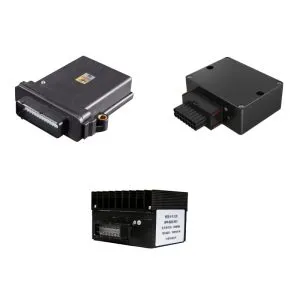
SonnePower Distributed I/O Modules
| Model | SPC-SDIO-S0808SPK |
| Channels | 8 DI / 8 DO |
| Communication | CAN bus, SAE J1939, CANopen |
| Operating Voltage | 8–32 VDC |
| Protection | IP67, shock and vibration resistant |
| Mounting | Direct on-vehicle, M6 screw holes |
Key Features:
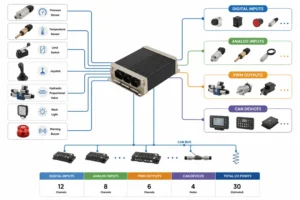
Up to 32 channels per module
Fully compatible with CANopen & SAE J1939
IP67 protection for harsh outdoor environments
LED indicators and built-in diagnostics for faster troubleshooting
Take Action: Get a Sample or Contact Us to discuss your project requirements.