Skip to content
7-Inch CAN Bus Display Series
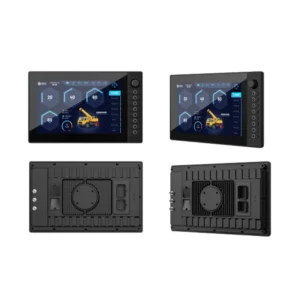
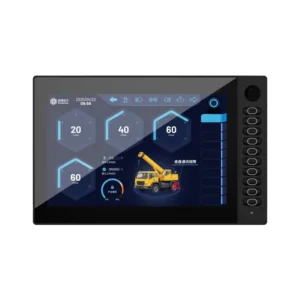
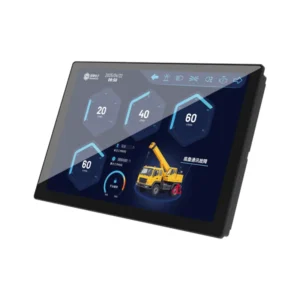
SonnePower 7-inch CAN bus HMI displays are programmable operator interfaces designed for mobile machinery control systems. The A, E, B and H Series combine CODESYS 3.5 programming, IP65 protection, CAN communication, configurable local I/O and multiple display configurations.
Compare the available series according to CAN channel quantity, I/O capacity, CVBS or AHD camera inputs, 800 × 480 or 1024 × 600 resolution, brightness, startup time and 4G connectivity.
Compare 7-Inch CAN Bus HMI Display Series
Compare the communication interfaces, I/O resources, video inputs, resolution, brightness, operator controls, and connectivity of the four 7-inch display series.
| Feature | A Series | E Series Upgraded from the A Series | B Series | H Series Upgraded from the B Series |
|---|---|---|---|---|
| Programming Environment | CODESYS 3.5 | CODESYS 3.5 | CODESYS 3.5 | CODESYS 3.5 |
| I/O Resources | 6 resources Up to 6 inputs / 2 outputs | 6 resources Up to 6 inputs / 2 outputs | 20 resources Up to 20 inputs / 8 outputs | 20 resources Up to 20 inputs / 8 outputs |
| Video Inputs | 2 × CVBS | 2 × Analog AHD | 4 × CVBS | 4 × Analog AHD |
| Communication Interfaces | 2 × CAN 1 × RS232 1 × Ethernet | 2 × CAN 1 × RS232 1 × Ethernet | 5 × CAN 1 × RS232 1 × Ethernet | 5 × CAN 1 × RS232 1 × Ethernet |
| Resolution | 800 × 480 | 1024 × 600 | 800 × 480 | 1024 × 600 |
| Brightness | 400 or ≥600 cd/m² | 450 or ≥600 cd/m² | 400 or ≥600 cd/m² | 450 or ≥600 cd/m² |
| Operator Controls | 8 programmable buttons | 8 programmable buttons | 9 buttons and 1 rotary encoder | 9 buttons and 1 rotary encoder |
| Startup Time | Standard | ≤5 seconds | Standard | ≤5 seconds |
| 4G | Yes | No | Yes | Yes |
Available configurations may vary within each series. Confirm the required interfaces, I/O, brightness, and connectivity before selection.

How to Choose a 7-Inch CAN Bus Display
Select a series according to the required CAN channels, local I/O, camera interface, resolution, startup time, and cellular connectivity.
A Series
Choose the A Series for systems requiring 2 CAN interfaces, CVBS video inputs, programmable buttons, and optional 4G connectivity.
E Series
Choose the E Series when the project requires 1024 × 600 resolution, Analog AHD camera inputs, and startup within 5 seconds, but does not require 4G.
B Series
Choose the B Series for control systems requiring 5 CAN interfaces, more configurable local I/O, CVBS video inputs, and 4G connectivity.
H Series
Choose the H Series when the system needs 1024 × 600 resolution, Analog AHD camera inputs, 5 CAN interfaces, expanded local I/O, fast startup, and 4G connectivity.
Not sure which series fits your system? Send us your CAN, I/O, camera, resolution, and connectivity requirements.
Contact UsFrequently Asked Questions
Find answers to common questions about selecting a 7-inch CAN bus display.
What is the difference between the A, E, B and H Series?
The A and E Series provide fewer CAN and local I/O resources, while the B and H Series are designed for systems requiring more CAN interfaces and configurable I/O. The E and H Series also provide higher resolution, Analog AHD camera inputs and faster startup.
Which series provide 1024 × 600 resolution?
The E Series and H Series provide 1024 × 600 resolution. The A Series and B Series use 800 × 480 resolution.
Which series support Analog AHD camera inputs?
The E Series provides two Analog AHD inputs, while the H Series provides four. The A and B Series use CVBS video inputs instead.
Which series should I choose for more CAN interfaces and local I/O?
The B and H Series are the better options when the system requires additional communication and control resources. Both provide five CAN interfaces and more configurable local I/O than the A and E Series.
Which 7-inch display series support 4G?
The A, B and H Series offer 4G connectivity. The E Series does not include 4G.
How can I confirm the correct display configuration?
Send us your required CAN channels, I/O resources, camera interface, resolution, brightness, startup time and connectivity requirements. We will help you identify the appropriate series and configuration.
Contact Us