 Skip to content
CANopen vs CAN: Key Differences, Protocol Layers, and Engineering Selection Guide
In industrial automation, mobile machinery, and embedded control systems, CAN and CANopen are often mentioned together. This creates confusion for engineers and buyers evaluating controllers, I/O modules, HMIs, sensors, drives, or distributed control architectures.
A common misunderstanding is that CANopen replaces CAN. This is incorrect.
CAN defines how messages are transmitted. CANopen defines how devices understand, organize, configure, and manage those messages.
What Is CAN Bus?
CAN, short for Controller Area Network, is a communication protocol originally developed for automotive and embedded control systems. It allows multiple electronic devices to exchange data over a shared network without requiring a central host.
CAN mainly standardizes:
- Physical layer signaling
- Data frame structure
- Message arbitration
- Error detection
- Reliable message transmission
However, CAN itself does not define device configuration, object mapping, diagnostics behavior, network management, or device profiles. This means a CAN network can transmit frames, but it does not guarantee that all devices understand each other’s data meaning.
What Is CANopen?
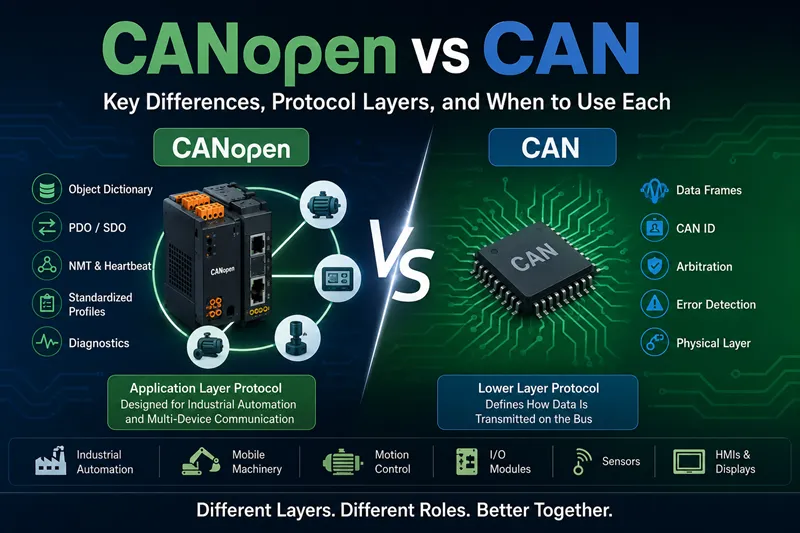
CANopen vs CAN: Protocol Layer Comparison
CAN defines how data is transmitted on the bus. CANopen builds on CAN and defines how devices communicate, configure, and manage data.
CAN
- Transmits CAN data frames
- Handles message priority and arbitration
- Provides basic error detection
- Does not define device configuration
CANopen
- Uses CAN as the communication bus
- Adds Object Dictionary for device parameters
- Uses PDO / SDO for data and configuration
- Adds network management and diagnostics
CANopen is a higher-layer communication protocol built on top of CAN. It adds a standardized communication structure for device configuration, real-time data exchange, diagnostics, and network management.
In simple terms, CAN is the bus, while CANopen is the communication language used by devices on that bus.
Object Dictionary: The Core of CANopen
Every CANopen device contains an Object Dictionary. It works like an internal database that stores device parameters, configuration values, communication objects, and manufacturer-specific settings.
Instead of manually decoding every byte in a raw CAN frame, engineers can access standardized objects by index and sub-index. This improves interoperability, configuration efficiency, diagnostics, and maintenance.
PDO vs SDO: Real-Time Data vs Configuration Data
PDO
Process Data Object is used for fast, real-time data exchange.
- Sensor values
- Switch status
- Motor feedback
- I/O status
SDO
Service Data Object is mainly used for parameter access and configuration.
- Read device parameters
- Write configuration values
- Set Node ID
- Adjust mapping settings
PDO is for runtime data. SDO is for configuration and parameter access.
NMT and Heartbeat: CANopen Device State Management
CANopen also defines network management through NMT and Heartbeat mechanisms. NMT controls device states such as initialization, pre-operational, operational, and stopped.
Heartbeat helps the controller monitor whether each node is still alive. If an I/O module, display, sensor, or drive stops sending heartbeat messages, the controller can detect the issue and trigger fault handling.
This is especially useful in systems that include multiple devices, such as a controller, display, distributed I/O module, sensors, and actuators.
CANopen Network Topology Example
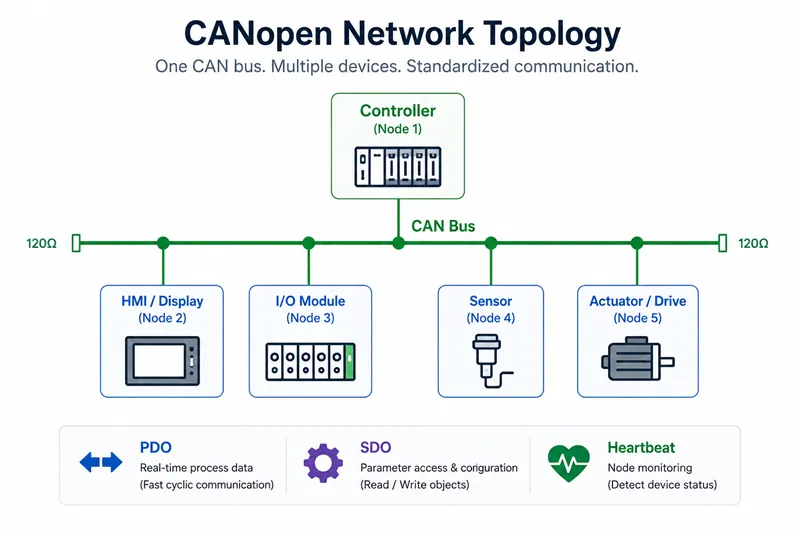
In a CANopen network, one controller can manage multiple nodes on the same CAN bus. Each device usually has a unique Node ID and communicates through standardized objects, PDOs, SDOs, NMT messages, and Heartbeat monitoring.
For mobile machinery systems, this structure can connect controllers, displays, distributed I/O modules, sensors, actuators, valves, and drive systems through one organized communication network.
The physical CAN bus only carries messages. CANopen adds the standardized structure that helps each node know what the messages mean and how the network should be managed.
CANopen vs CAN: Engineering Comparison
The biggest difference is not speed or hardware. The difference is whether your system needs standardized communication, diagnostics, and interoperability.
| Feature | CAN | CANopen |
|---|---|---|
| Protocol Layer |
Lower Layer
Physical + Data Link |
Higher Layer
Built on top of CAN |
| Communication | Custom message definition | Standardized PDO / SDO |
| Configuration | Manual | Object Dictionary |
| Diagnostics | Limited | Heartbeat + Monitoring |
| Interoperability | Lower | Higher |
| Typical Use |
ECUs Custom embedded systems |
Industrial automation Controllers Displays I/O modules |
Can CANopen and Standard CAN Devices Work Together?
Sometimes they can share the same physical CAN bus, but this does not mean they understand each other logically.
A standard CAN device may match the same baud rate and electrical layer, but it will not automatically understand CANopen communication objects such as PDO, SDO, Object Dictionary, NMT, or Heartbeat.
Same CAN bus does not mean same application-layer protocol. A device with a CAN port is not automatically a CANopen device.
Common Integration Mistakes
Assuming CAN Port Means CANopen Support
A device with a CAN interface does not necessarily support CANopen. Always confirm CANopen profile support, EDS/XDD files, and PDO/SDO mapping.
Ignoring Node ID Planning
Each CANopen node needs a unique Node ID. Duplicate Node IDs can cause communication conflicts and commissioning failures.
Ignoring PDO Mapping
Incorrect PDO mapping may result in wrong data interpretation, missing signals, unstable control behavior, or extra debugging work.
When Should You Use Standard CAN?
Use standard CAN when your project requires a custom communication protocol, simple ECU-to-ECU messaging, low-cost embedded communication, or proprietary machine control logic.
CAN is suitable when your engineering team controls both sides of the communication and does not need standardized third-party device interoperability.
Use CAN When You Need:
- Custom message definitions
- Simple ECU-to-ECU communication
- Proprietary control logic
- Low-level embedded communication
- Full control over data format
Use CANopen When You Need:
- Standardized device communication
- Multi-vendor interoperability
- Object Dictionary access
- PDO / SDO communication
- Network management and diagnostics
When Should You Use CANopen?
Use CANopen when your system needs standardized communication between multiple devices, especially when integrating controllers, I/O modules, HMIs, sensors, drives, and actuators from different suppliers.
CANopen is often more suitable for industrial automation, motion control, distributed I/O systems, and mobile machinery networks where long-term maintainability matters.
Choose CAN when you need custom low-level communication. Choose CANopen when you need standardized communication between multiple devices.
CANopen vs J1939 vs CAN FD
CANopen, J1939, and CAN FD are often compared, but they are not the same type of concept.
| Feature | CANopen | J1939 | CAN FD |
|---|---|---|---|
| Main Industry |
Industrial automation Motion control |
Mobile machinery Construction equipment | General CAN systems |
| Purpose | Standardized communication | Vehicle communication | Increase frame size & speed |
| Diagnostics | Built-in | Vehicle focused | Depends on protocol |
| Typical Devices |
I/O modules Controllers Displays |
ECUs Engines | Any CAN FD supported device |
Engineering Checklist Before Choosing CANopen
Before selecting CANopen devices for a project, confirm the following:
The expensive mistake is usually not choosing CAN instead of CANopen. The expensive mistake is assuming all CAN devices speak the same language simply because they share the same bus.
Need CAN-Based Control Products for Mobile Machinery?
SonnePower provides rugged CAN communication products for mobile machinery applications, including controllers, CAN bus displays, and distributed I/O modules.
Request Technical Support →Related CAN Products
Mobile Machinery Controllers
Programmable controllers for off-highway vehicles, construction equipment, and industrial machinery.
View Products →CAN Bus I/O Modules
Distributed CAN I/O modules supporting machine control and expansion.
View Products →CAN Bus Displays
Rugged displays for diagnostics, machine monitoring, and operator interfaces.
View Products →Frequently Asked Questions
What is the main difference between CAN and CANopen?
CAN defines lower communication layers, while CANopen standardizes higher-layer communication, configuration, and diagnostics.
Can CANopen and CAN devices share one bus?
Physically possible, but protocol compatibility is not guaranteed.
Is CANopen suitable for mobile machinery?
Yes, especially when standardized communication is required between controllers, displays, I/O modules, sensors, and actuators.
Is CANopen better than standard CAN?
Not always. CANopen adds interoperability and diagnostics but increases complexity.