Skip to content
J1939 Baud Rate Mismatch Explained: 250k vs 500k Troubleshooting
In many mobile machinery projects, the CAN bus network appears physically connected and powered correctly, but the HMI display still cannot read engine RPM, coolant temperature, fuel level, or diagnostic data.
One of the most common causes is a J1939 baud rate mismatch.
This problem frequently occurs during:
- machine retrofits
- aftermarket display installations
- telematics integration
- ECU replacement
- multi-controller projects
In many cases, the issue is not wiring damage or ECU failure. The devices are simply communicating at different CAN bus speeds.
This article explains how J1939 baud rate mismatch happens, the symptoms it causes, and how engineers can diagnose and fix it in real mobile machinery applications.
What Is the Standard J1939 Baud Rate?
SAE J1939 is based on the CAN bus protocol and is widely used in:
- construction equipment
- agricultural machinery
- mining machines
- sanitation vehicles
- forestry equipment
- heavy-duty trucks
Traditional J1939 networks commonly operate at:
- 250 kbit/s
- sometimes 500 kbit/s in newer or higher-speed systems
Many legacy engine ECUs still use 250k, while some newer displays, telematics gateways, and control systems may be configured for 500k by default.
This creates compatibility problems if the baud rates do not match.
J1939 250k vs 500k
250k Networks
250k is still the most common baud rate in traditional off-highway engine communication networks.
Typical examples:
- diesel engine ECUs
- agricultural machinery
- older hydraulic controllers
- legacy machine systems
Advantages:
- better stability over longer harnesses
- lower signal sensitivity
- widely supported by older ECUs
500k Networks
500k networks are becoming more common in:
- modern control systems
- advanced HMI displays
- telematics devices
- high-speed data applications
Advantages:
- faster data transmission
- lower latency
- better for large data volumes
However, 500k requires better wiring quality and shorter network design.
Why Baud Rate Mismatch Breaks Communication
CAN bus communication depends on precise timing.
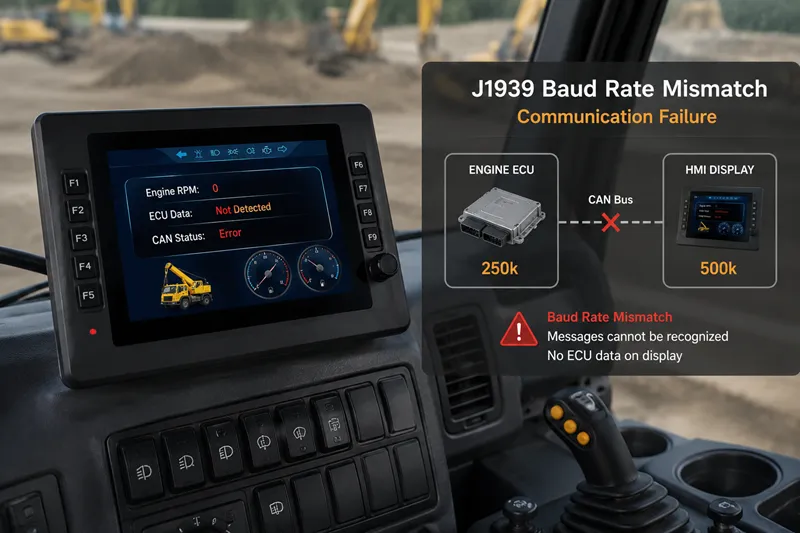
If one device transmits at 250k and another listens at 500k, the receiving device cannot correctly interpret the CAN frames.
The result is:
- no readable messages
- communication errors
- missing PGNs
- unstable diagnostics
- HMI displays showing zero or blank values
The devices may still power on normally, which often confuses engineers during troubleshooting.
Common Symptoms of J1939 Baud Rate Mismatch
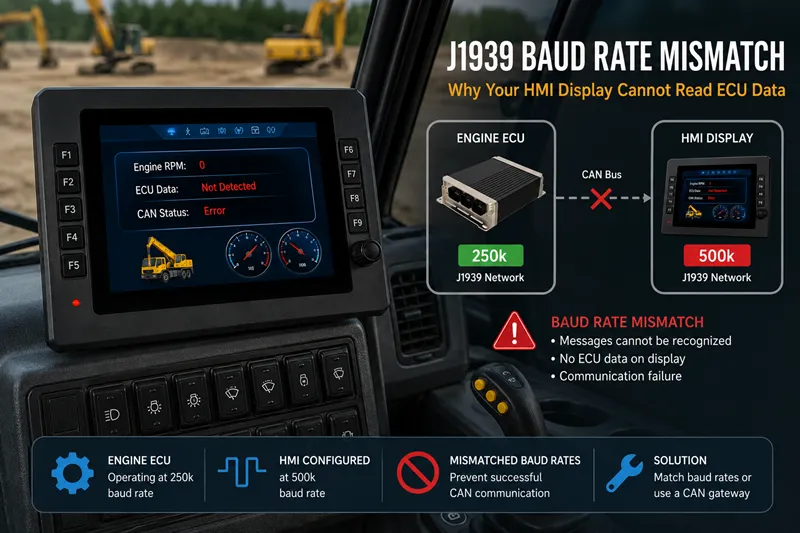
HMI Display Shows No Engine Data
-
This is one of the most common symptoms.
The display powers on normally but shows:
- RPM = 0
- coolant temperature unavailable
- oil pressure unavailable
- fuel level unavailable
The screen itself is not faulty. It simply cannot decode the CAN frames.
Diagnostic Tool Cannot Detect ECU
A CAN or J1939 diagnostic tool may report:
- no ECU found
- no J1939 traffic
- no PGN detected
This often happens when the tool is scanning at the wrong baud rate.
Intermittent Communication
Sometimes communication appears unstable:
- data appears briefly
- values freeze randomly
- messages disappear after startup
In retrofit projects, this can happen when different devices on the machine use different CAN speed settings.
Real-World Example: Agricultural Sprayer Retrofit
During a retrofit project on an agricultural sprayer, a new CAN bus HMI was added to monitor engine data.
The display powered on correctly, but:
- engine RPM stayed at zero
- coolant temperature showed blank
- fuel consumption data was unavailable
The wiring and PGN mapping were checked multiple times.
Eventually, engineers discovered:
- the engine ECU operated at 250k
- the HMI default configuration was 500k
After changing the display baud rate to 250k, communication immediately returned.
Why This Problem Happens Frequently in Retrofit Projects
Modern mobile machinery often contains multiple CAN networks.
Examples include:
- engine CAN
- hydraulic CAN
- telematics CAN
- implement control CAN
- ISOBUS networks
Problems occur when:
- a new display is added
- a controller is replaced
- a telematics gateway is installed
- aftermarket electronics are integrated
Many devices ship with default baud rate settings that may not match the original machine network.
How to Diagnose J1939 Baud Rate Mismatch
1. Identify the Existing Network Speed
Before connecting a new display or controller, verify the existing network baud rate.
Common methods:
- OEM documentation
- CAN analyzer tools
- diagnostic software
- ECU configuration files
Never assume all J1939 networks use the same speed.
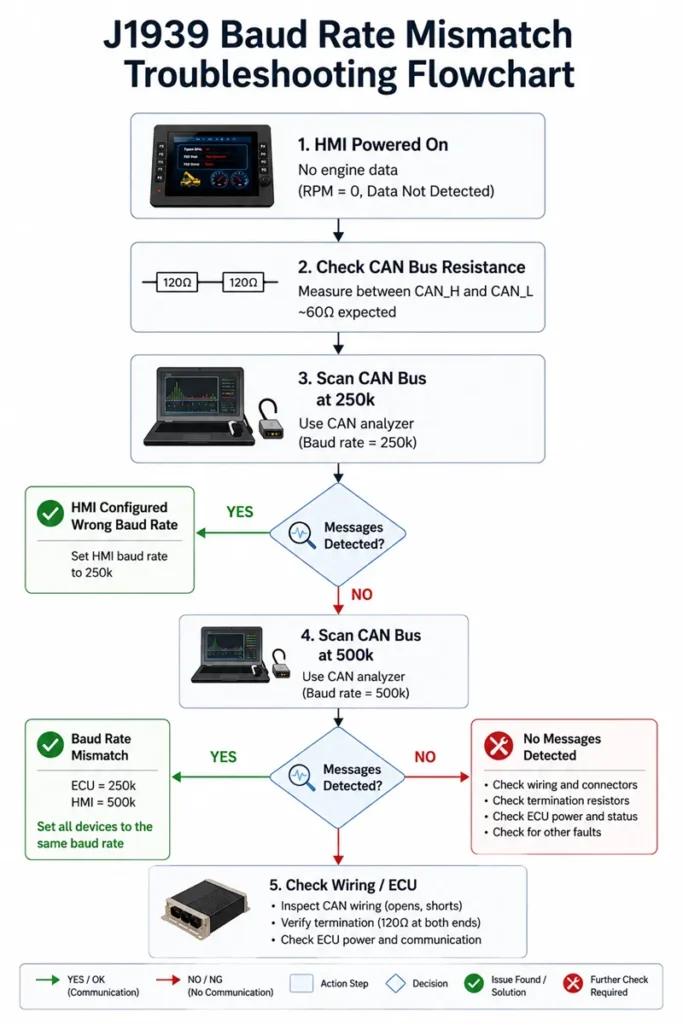
2. Scan the Network at Multiple Baud Rates
Most CAN diagnostic tools allow scanning at:
- 250k
- 500k
- automatic detection
If no messages appear at 500k, try 250k immediately.
3. Use Silent Mode or Listen-Only Mode
Many CAN analyzers support:
- silent mode
- listen-only mode
This allows the tool to monitor network traffic without transmitting messages that could interfere with the machine.
Silent mode is especially useful when diagnosing unknown networks.
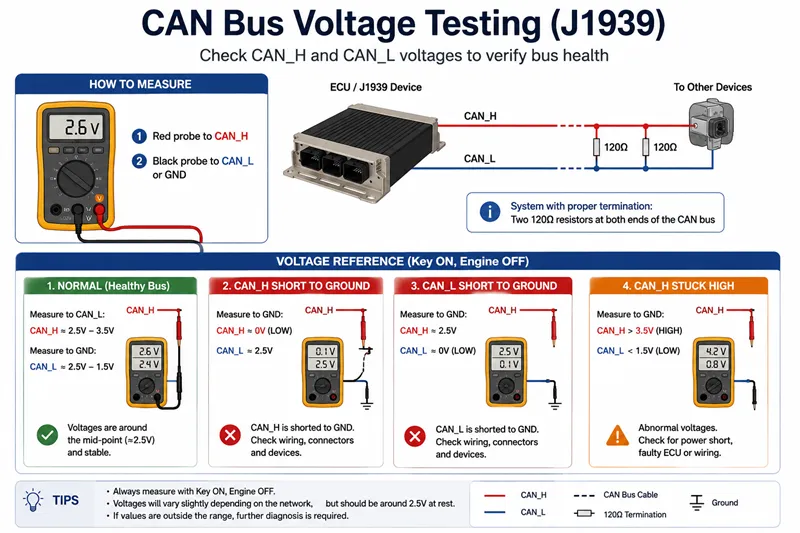
4. Verify CAN Voltage and Resistance
Before assuming baud rate problems, verify the physical CAN layer.
Typical checks include:
CAN Resistance
Measure between:
- CAN_H
- CAN_L
with power OFF.
A healthy network often measures approximately:
Req=120+120120×120=60 Ω
This represents two 120Ω termination resistors connected in parallel.
CAN Voltage
Typical idle voltage values:
- CAN_H ≈ 2.5V to 3.5V
- CAN_L ≈ 2.5V to 1.5V
Abnormal voltage may indicate:
- grounding problems
- short circuits
- wiring faults
Can 250k and 500k Devices Communicate Directly?
No.
A 250k device and a 500k device cannot directly understand each other’s CAN frames.
Possible solutions include:
- configuring all devices to the same baud rate
- using separate CAN channels
- installing a CAN gateway or baud rate converter
Directly mixing different CAN speeds on the same network will not work reliably.
Mobile Machinery Problems That Make Diagnosis Harder
In off-highway equipment, additional issues may complicate troubleshooting:
- long wiring harnesses
- vibration
- connector corrosion
- hydraulic EMI
- poor grounding
- multiple ECUs
- harsh outdoor environments
These conditions can make baud rate mismatch appear similar to wiring faults.
Best Practices for Stable J1939 Communication
Verify Baud Rate Before Installation
Always confirm:
- ECU CAN speed
- display CAN speed
- controller CAN configuration
before connecting devices.
Avoid Blind Auto Configuration
Some devices attempt automatic baud rate detection, but this is not always reliable in noisy machine environments.
Manual verification is safer.
Separate Different CAN Networks
Some devices attempt automatic baud rate detection, but this is not always reliable in noisy machine environments.
Manual verification is safer.
Choosing a J1939 Display for Mobile Machinery
When selecting a CAN bus display or controller, engineers should consider:
- configurable baud rates
- multi-CAN interfaces
- J1939 compatibility
- rugged design
- EMC resistance
- mobile machinery reliability
SonnePower provides rugged CAN bus displays, controllers, and distributed I/O modules for:
- construction equipment
- agricultural machinery
- sanitation vehicles
- mining machines
- special-purpose vehicles
with support for:
- SAE J1939
- CANopen
- custom CAN protocols
- multi-network integration