 Skip to content
How J1939 Address Claim Works: Source Address Conflicts, NAME Priority, and ECU Integration
Table of Contents
In a J1939 network, every ECU must have a unique identity before it can communicate.
This identity is not just a number. It is established through a structured process called Address Claim, which determines:
- Which ECU gets which Source Address
- What happens when two ECUs use the same address
- How NAME priority decides the winner
- Whether a device can stay on the network at all
For OEMs and system integrators, understanding this process is critical. Many integration issues with controllers, displays, or I/O modules are not hardware problems—they are address claim conflicts.

What Is J1939 Address Claim?
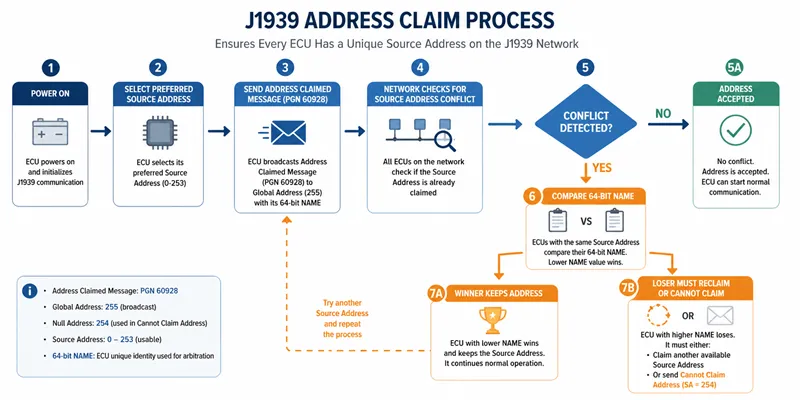
J1939 Address Claim is the mechanism that ensures every ECU on the CAN bus has a unique Source Address.
When an ECU powers on:
- It selects a preferred Source Address
- It broadcasts an Address Claimed message (PGN 60928)
- Other ECUs check for conflicts
- If no conflict exists, the ECU keeps the address
This process happens automatically at startup and may repeat if conflicts occur.
Source Address in J1939: Why It Matters
The Source Address (SA) is the identifier used in every J1939 message.
- Range: 0–253 (usable addresses)
- 254: Null address
- 255: Global broadcast
Every message sent on the network includes the Source Address, which means:
- If two ECUs use the same address → communication ambiguity
- Diagnostics, commands, and data may be misinterpreted
- The system becomes unstable or unpredictable
This is why Address Claim is not optional—it is required for network integrity.
Address Claimed Message (PGN 60928)
During startup, the ECU sends:
- PGN: 60928
- Destination: Global (255)
- Payload: 64-bit NAME
This message tells the entire network:
“I am using this Source Address, and here is my identity.”
The network then decides whether this claim is accepted.
The 64-bit NAME: The Real Identity of an ECU
The NAME field is the key to resolving conflicts.
It is a 64-bit value composed of multiple fields, including:
- Manufacturer Code
- Function (what the ECU does)
- ECU Instance
- Function Instance
- Identity Number
This structure ensures that every ECU can be uniquely identified—even if two devices try to use the same Source Address.
NAME Priority: Why Lower Value Wins
When two ECUs claim the same Source Address, J1939 does not rely on timing or randomness.
Instead, it compares their NAME values.
Rule:
The ECU with the numerically lower NAME value wins
- Winner → keeps the Source Address
- Loser → must give it up
This is deterministic and ensures consistent behavior across the network.
What Happens During a Source Address Conflict?
Here is the real sequence:
- Two ECUs claim the same Source Address
- Both broadcast PGN 60928
- Each ECU compares its NAME with the other
- Lower NAME wins
- Higher NAME loses
The losing ECU must then:
- Try another address, or
- Send Cannot Claim Address
This process happens very quickly during startup.

Cannot Claim Address and Null Address 254
If an ECU cannot find a valid address, it sends a special message:
- Cannot Claim Address
- Uses Source Address = 254 (Null Address)
At this point:
- The ECU is not fully functional on the network
- It typically cannot participate in normal communication
- It may remain in a limited or diagnostic-only state
For OEM systems, this usually means:
The device is present, but not properly integrated.
Why Address Conflicts Happen in Real Systems
In theory, Address Claim is simple.
In real machines, conflicts are very common.
Typical causes include:
1. Duplicate Source Address
- Two devices configured with the same default address
- Common with identical I/O modules or displays
2. Default or Generic NAME
- Some devices ship with similar NAME structures
- This increases conflict probability
3. Third-party ECU Integration
- Adding a new controller or HMI without checking existing addresses
- No address planning across suppliers
4. Multiple Devices of the Same Type
- Example: two identical expansion modules
- Both try to claim the same address
5. Startup Timing Misinterpretation
- Engineers assume “first device wins”
- In reality, NAME decides—not timing
J1939 ECU Integration: What OEMs Must Get Right
When integrating controllers, HMIs, or I/O modules into a J1939 network, Address Claim must be planned—not left to defaults.
Address Planning
- Assign unique Source Addresses for each ECU
- Avoid relying on factory defaults
- Maintain an address map for the entire machine
NAME Configuration
- Ensure each ECU has a unique NAME
- Especially important when using multiple identical devices
System-Level Thinking
A typical mobile machinery architecture may include:
- Main controller (vehicle control)
- Display / HMI
- Distributed I/O modules
- Engine ECU
- Hydraulic controller
All of these must coexist on the same J1939 network without conflict.
Practical Troubleshooting Workflow
When Address Claim issues occur, use this sequence:
Step 1 — Check PGN 60928 Traffic
- Verify that Address Claimed messages are present
- Confirm Source Address and NAME values
Step 2 — Identify Duplicate Source Address
- Look for multiple ECUs claiming the same SA
Step 3 — Compare NAME Values
- Determine which ECU should win
- Check if the “wrong device” is winning
Step 4 — Check for Cannot Claim Address
Source Address 254 indicates failure
Step 5 — Verify Configuration
- Source Address settings
- NAME configuration
- Device firmware
Step 6 — Validate Network Conditions
- Baud rate mismatch
- CAN termination issues
- Silent/listen-only mode
Practical Checklist Before Adding a New ECU
Before connecting a new device to a J1939 network:
- Confirm its preferred Source Address
- Check existing addresses on the network
- Ensure the NAME is unique
- Avoid duplicate configurations for identical devices
- Verify baud rate and CAN wiring
- Observe Address Claim during startup
This simple checklist can prevent most integration failures.