 Skip to content
DM1 vs DM2 in J1939: How Displays Should Show Active and Stored Faults
Table of Contents
In J1939 diagnostics, DM1 and DM2 are often explained as active faults versus stored faults. That definition is correct, but it is not enough for display design.
For an HMI, the real question is not only what DM1 and DM2 mean. The real question is how the display should present them so operators can react correctly and service technicians can diagnose efficiently.
That is where many systems still fall short. DM1 carries active diagnostic trouble codes and lamp status, while DM2 is typically used to retrieve previously active fault records. Because their meaning is different, the display logic should also be different.
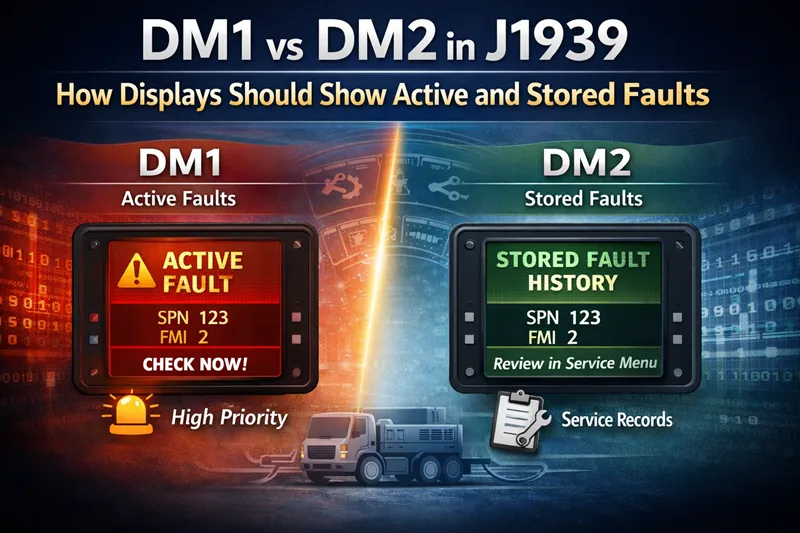
What DM1 and DM2 Mean in J1939
DM1 shows active faults
DM1 is used for active diagnostic trouble codes. It is associated with faults that are currently present and may affect machine operation right now. Depending on system behavior, DM1 can be broadcast periodically and also updated when fault status changes, which is why it often serves as the main source for real-time fault visibility on a display.
DM2 shows previously active or stored faults
DM2 is used for previously active diagnostic trouble codes, often treated as stored fault history. Unlike DM1, DM2 is commonly retrieved on request rather than continuously used as the main live alarm source. That difference matters a lot in HMI design, because stored history should not automatically be treated like current machine risk.
SPN, FMI, and occurrence count still matter
Whether a fault comes from DM1 or DM2, the display may still need to show structured fault information such as SPN, FMI, occurrence count, ECU source, and a readable fault description. These fields help service personnel interpret the event correctly, but the operator-facing layer should stay more focused and easier to understand.
Why Displays Should Not Show DM1 and DM2 the Same Way
A common mistake is to treat active faults and stored faults as if they belong to the same alert layer. On many machines, that leads to confusion. An operator sees a serious-looking fault entry on screen and assumes the problem is current, even when the code is only historical.
That is the core design issue. DM1 represents current fault state. DM2 represents fault history. If both are shown with the same color, the same priority, and the same interruption behavior, the display stops helping and starts creating ambiguity.
A better rule is simple: DM1 should represent current machine risk, while DM2 should represent diagnostic history. This matches the protocol meaning more closely and makes the interface easier to understand in real operation. That distinction is implied across protocol explanations and display manuals, but most results stop short of turning it into a clear HMI design principle.

How a Display Should Show DM1 Active Faults
Give DM1 the highest visual priority
If a fault is active, it belongs to the current machine state. That means DM1 should have higher visual priority than stored fault history. In practice, this usually means:
- active warning area on the main screen
- popup or banner for new critical events
- fault lamp status shown clearly
- quick access to a current fault list
This is consistent with the role of DM1 as the live fault source for active DTCs and lamp information.
Show enough detail, but not too much
For operator-facing screens, the display does not always need to show raw SPN and FMI first. A readable description such as “Engine coolant temperature high” may be more useful at the top layer, while SPN/FMI details can remain one step deeper for service use.
That split matters because operators need fast recognition, while technicians need fault precision.
Let severity control the interruption level
If fault lamp behavior indicates a more urgent condition, the interface should reflect that through stronger visual emphasis. Not every active fault needs the same level of interruption, but active faults do need a consistent and explainable priority model.
Some display implementations already support alarm and table behaviors separately, which reinforces the idea that display logic should follow fault state and severity rather than just list every code equally.
How a Display Should Show DM2 Stored Faults
DM2 belongs in a service or history layer
DM2 should usually appear in a stored fault page, service menu, or diagnostics history view. That page can include the same structured data fields as DM1, but the visual treatment should make it clear that the issue is not necessarily active now.
A stored fault can still be important. It may reveal intermittent faults, previous events, or recurring system problems. But that is different from telling the operator the machine is currently in alarm.
Use request-based logic where appropriate
Because DM2 is commonly request-based, it is well suited to a user action such as:
- View stored faults
- Read history
- Request inactive DTCs
That interaction model is more appropriate than showing DM2 content permanently in the same place as real-time active warnings. This behavior is also reflected in display manuals that separate active and stored fault access paths.
Make stored history readable
A good stored-fault page should help service users scan and interpret the data. That often means:
- grouping by ECU
- showing SPN/FMI and description together
- supporting multiple stored entries
- keeping historical items visually distinct from live alarm content
Operator View and Service View Should Not Be the Same
What operators need
Operators usually need:
- current fault visibility
- clear severity signal
- short readable wording
- minimal distraction
- confidence about whether the issue is happening now
What service technicians need
Technicians usually need:
- SPN
- FMI
- occurrence count
- ECU source
- stored history
- ability to compare active and previously active states
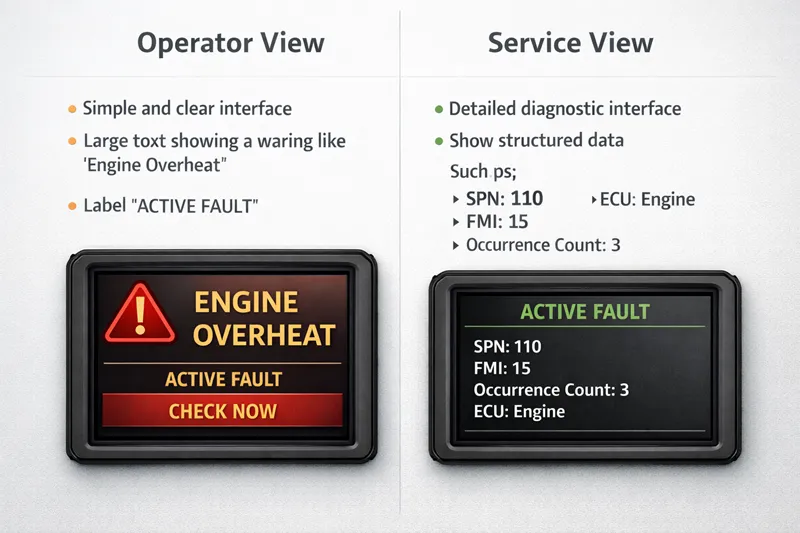
The same fault may need two presentations
The same SPN/FMI may first appear in DM1 as an active issue, then later move into DM2 as history after the condition clears. If the screen wording stays the same, users may think nothing changed. A better interface changes the presentation as the fault state changes.
For example:
- DM1 state: Active fault – check now
- DM2 state: Stored fault – previously active, review in service page
A Practical Display Model for DM1 and DM2
You can simplify the whole design into one decision model:
| Fault source | Meaning | Recommended screen location | Visual priority | User focus |
|---|---|---|---|---|
| DM1 | Active fault | Main alarm area / current fault page | High | Operator + service |
| DM2 | Previously active / stored fault | Service page / fault history page | Medium to low | Service mainly |
Recommended rule
Use this rule in your article because it is clear and practical:
DM1 should interrupt. DM2 should inform.
That single sentence is much more useful for HMI design than repeating the protocol definition alone.
Common Design Mistakes to Avoid
Mistake 1: Showing DM2 like a live red alarm
This is the biggest one. A stored fault should not look identical to an active live fault.
Mistake 2: Mixing operator language with service language
If the top screen is full of raw diagnostic fields, the operator may not understand what action is needed.
Mistake 3: Ignoring lamp status and priority logic
If a system supports lamp-related urgency, the HMI should not flatten everything into the same visual level.
Mistake 4: Not making fault state transitions clear
Users should be able to tell whether a fault is:
active now
cleared but stored
historical only
Conclusion
The difference between DM1 and DM2 in J1939 is straightforward at protocol level, but the display implication is where real design quality shows. DM1 is about current fault state and operator awareness. DM2 is about stored diagnostic history and service review. If a display presents both in the same way, it weakens clarity and can mislead users.
A better HMI separates active faults from stored faults visually, functionally, and contextually. For OEMs and machine display designers, that is the real step beyond simply decoding the messages.