 Skip to content

Guide to CAN Bus Keypad with Rotary Encoder for Machinery
Table of Contents
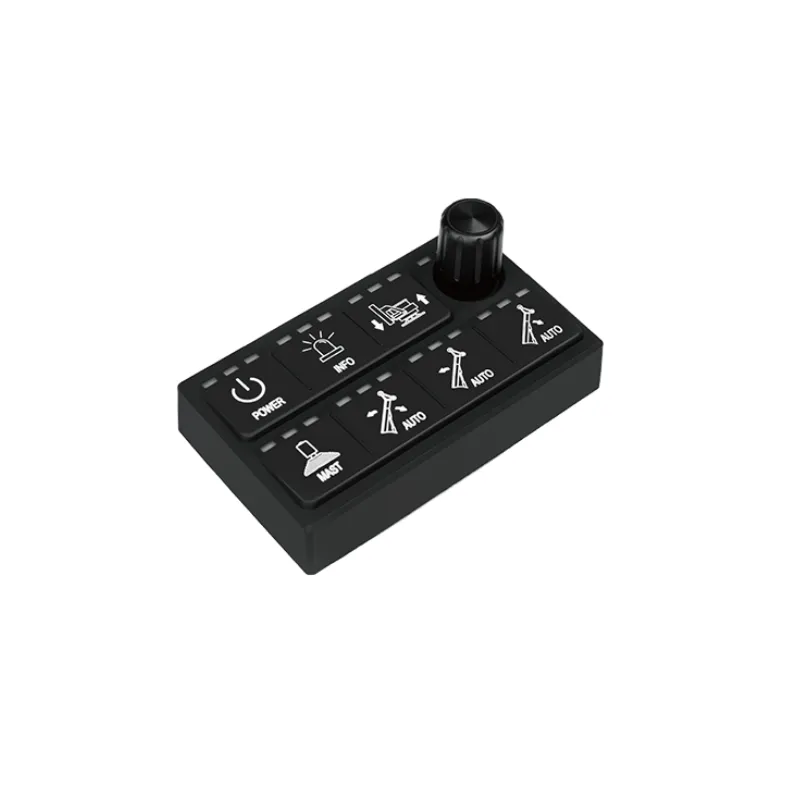
Modern machinery cabins need to support more functions without becoming more complicated to operate. Operators often need direct access to machine controls, menu navigation, parameter adjustment, and system interaction, all within limited dashboard space. This is where a CAN Bus keypad with rotary encoder becomes especially useful.
Instead of using many separate switches and controls, this type of device combines pushbuttons and rotary input into one compact operator interface. It helps simplify panel layout, reduce wiring complexity, and create a more organized control experience for modern machinery.
What a CAN Bus Keypad with Rotary Encoder Does
A CAN Bus keypad is more than a sealed switch panel. In machinery applications, it works as a networked input device that sends operator commands through the machine communication system rather than relying only on discrete wiring.
When a rotary encoder is added, the keypad becomes more flexible. Pushbuttons are well suited for direct machine functions, while the rotary encoder adds a second type of interaction for navigation and adjustment. This combination allows one compact control panel to handle both quick actions and more detailed control tasks.
In practical terms, it can help reduce dashboard clutter while making the operator interface more capable and easier to organize.
How It Fits Into a Machine Control System
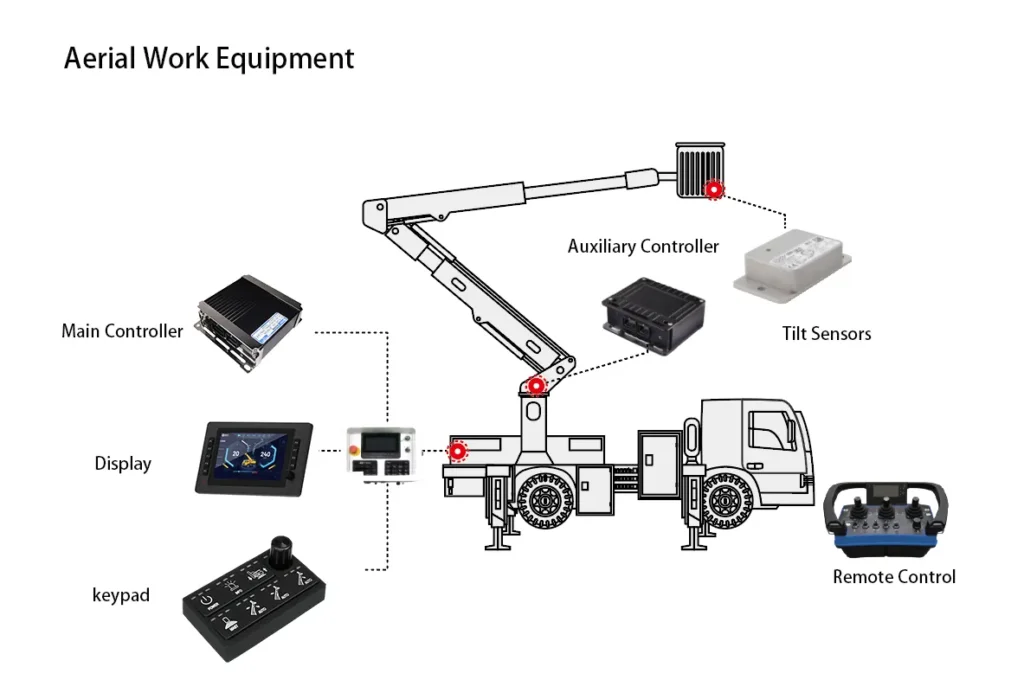
In real machine projects, the keypad is usually part of a larger HMI chain that includes the display, the controller, and the CAN network between them.
The keypad sends input signals over CAN, and those messages are then interpreted by the controller or display. Depending on the machine architecture, this may be based on J1939 or CANopen. The important point is not simply that the keypad “supports CAN,” but that it fits the communication logic of the whole system.
A well-integrated keypad should work as part of the machine control flow, not as an isolated input device. That means protocol compatibility, message mapping, and system response all matter during selection.
When to Use Pushbuttons and When to Use the Rotary Encoder
One of the most important design decisions is assigning the right tasks to the right control type.
Pushbuttons are best for direct-access functions. These are actions the operator may need quickly and frequently, such as lights, work modes, hydraulic functions, or predefined machine commands. A button is usually the best choice when the action should happen immediately with minimal interaction.
The rotary encoder is better for functions that involve movement through options or gradual changes. It is typically more suitable for:
- menu navigation
- parameter selection
- setpoint adjustment
- scrolling through options
- confirming a selection when push function is included
This does not mean the encoder should be used for everything. If too many important machine functions are moved into encoder-based menus, the interface can become slower and less intuitive, especially in demanding working conditions.
A practical approach is simple:
- use buttons for fast machine actions
- use the rotary encoder for navigation and adjustable values
- avoid putting urgent or high-frequency functions behind too many menu steps
Why This Type of Interface Works Well in Machinery
The biggest advantage of a CAN Bus keypad with rotary encoder is not just that it combines more controls into one device. Its real value is that it supports a smarter operator workflow.
In machinery, operators often need both speed and control clarity. Some functions must be triggered instantly, while others require adjustment or selection. A keypad with rotary encoder supports both needs in one integrated interface.
This is especially useful in cabins where space is limited and where adding more separate switches can make the layout harder to understand. A more integrated control element can help the dashboard stay cleaner and easier to use.
Rugged Design Is About More Than IP67
For machinery applications, ruggedness is essential. But rugged design is not only about IP67 protection.
In real machine environments, operators may wear gloves, cabins may vibrate, and equipment may work in mud, dust, water, or uneven terrain. In these conditions, tactile feedback, button spacing, and control clarity become just as important as sealing performance.
A keypad may look strong on paper, but it also needs to remain easy to operate during real work. The same applies to the rotary encoder. It should feel stable, controllable, and usable even when the machine is moving or vibrating.
Backlighting, Icons, and Operator Recognition
Backlighting and custom icons are also important in machinery control design. These features do more than improve appearance. They help operators identify functions faster and reduce confusion in low-light or complex operating environments.
A good keypad layout should make it easy to recognize which button controls which function. If the keypad is used across multiple machine variants, customizable legends and lighting can also support a more consistent operator experience.
When used well, these details improve usability and reduce operating errors.
How to Configure a CAN Bus Keypad with Rotary Encoder for a Real Project
good project does not start with button count. It starts with machine functions.
The first step is to define what the operator needs to do most often. Which actions require instant access? Which settings need adjustment? Which operations can be placed inside a menu structure? Once this is clear, the keypad layout becomes easier to design.
The next step is mapping those functions to CAN communication logic. Each button press or encoder movement should correspond to a clear system response. In a well-designed project, the keypad, display, and controller should work together as one HMI system.
It is also important to validate the layout in real operator use. A configuration that seems logical during design may feel awkward in the field. Testing with actual workflows is often the best way to confirm whether the interface is truly practical.
Going Beyond Basic Switching
Some CAN Bus keypads with rotary encoders offer more than button input alone. Depending on the model, they may also support additional analog or digital inputs, extended lighting logic, or more advanced customization features.
This can make the device more than just a control surface. In some applications, it becomes a more integrated part of the machine interface layer, helping reduce extra hardware while keeping system control more organized.
For compact machinery cabins, this can be a major advantage.
Conclusion
A CAN Bus keypad with rotary encoder is a strong solution for modern machinery when the goal is to build a cleaner, smarter, and more practical operator interface.
Buttons are ideal for direct machine functions. The rotary encoder is ideal for navigation and adjustable control. Together, they help reduce dashboard complexity while improving operator interaction.
The best results come when the keypad is selected not only for CAN compatibility or rugged construction, but also for how well it supports real machine workflows. When the control logic, layout, and operator use are aligned, a CAN Bus keypad with rotary encoder becomes much more than a sealed input device. It becomes a more effective HMI solution for machinery.