 Skip to content
CAN Bus Displays for Mobile Machinery
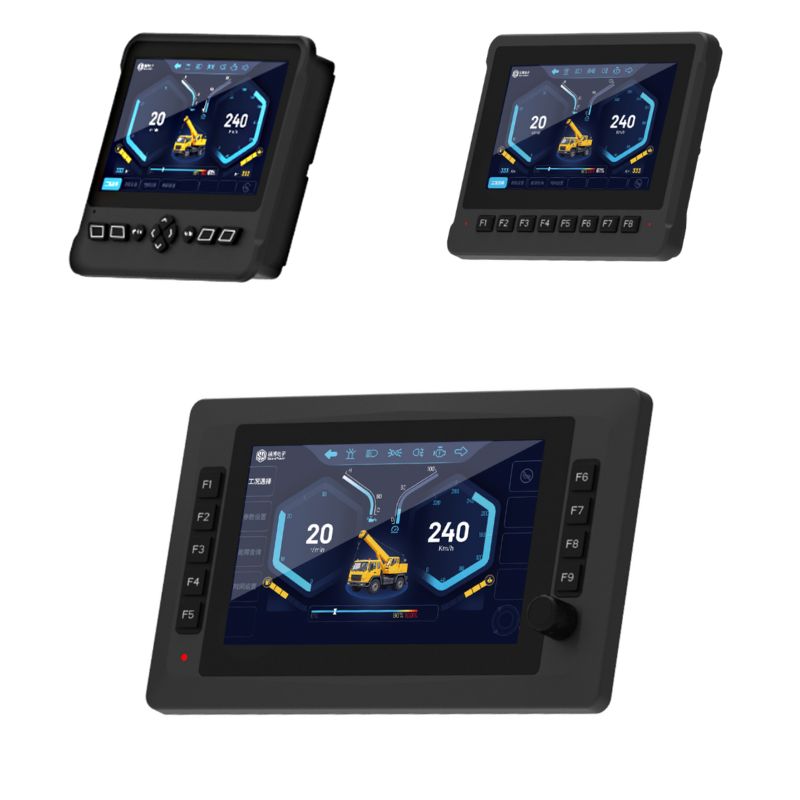
SonnePower CAN bus displays are designed for off-highway equipment that requires reliable communication, clear visualization, and stable operation in demanding working environments.
- Supports J1939, CANopen, and custom CAN communication
- Rugged display solutions for construction, agriculture, mining, and sanitation equipment
- Available in multiple screen sizes for different machine interfaces

Rugged HMI Displays for Harsh Mobile Equipment
Mobile machinery often operates in dusty, wet, high-vibration, and high-glare environments. A CAN bus display is more than a screen—it acts as the operator interface for machine data visualization, alarm display, status monitoring, and system interaction.
SonnePower CAN bus displays are built for mobile machines and support common communication protocols such as J1939, CANopen, and custom CAN. With high-brightness screens, flexible interfaces, and wide input voltage compatibility, they are suitable for a wide range of off-highway applications.
Browse Sonnepower CAN Bus Displays
4.3" CAN Bus Display
Compact display solution for small operator panels and space-limited machine cabins.
Best for: compact machines and auxiliary interfaces

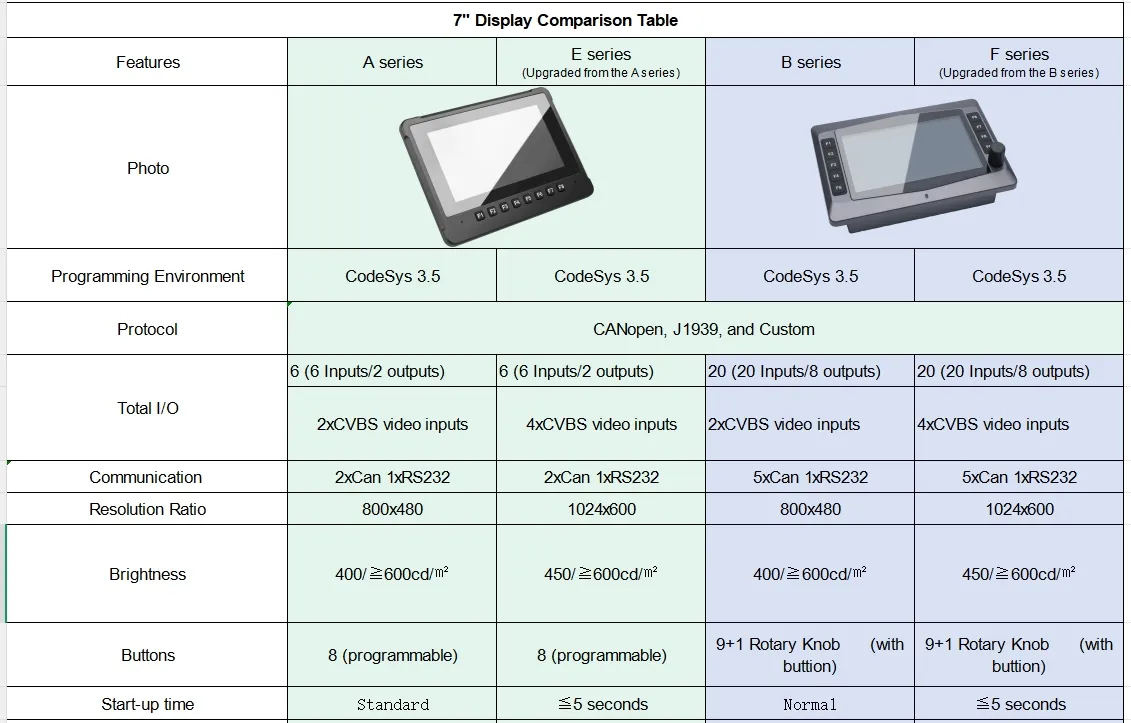
7" CAN Bus Display
A popular size for machines requiring more data visibility and a better HMI experience.
Best for: multifunction machine interfaces
10.1" CAN Bus Display
Larger screen area for advanced visualization, machine monitoring, and richer operator interaction.
Best for: complex working functions and larger cabins

12" CAN Bus Display
Designed for equipment that needs a large and clear display area for multiple operating parameters.
Best for: heavy-duty and large equipment interfaces

Applications of Rugged Display in Mobile Machinery
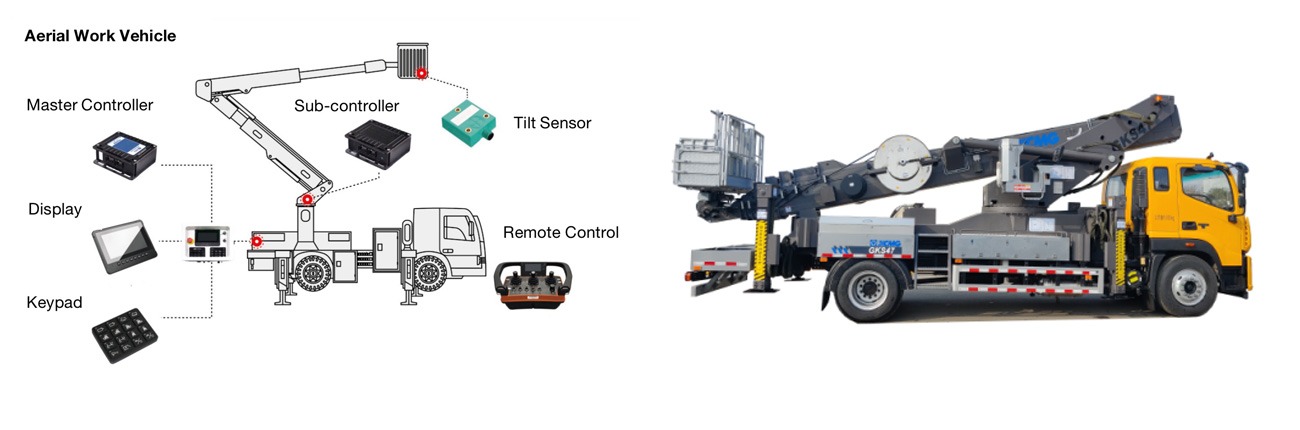
1. Aerial Work Vehicle 🏗️
Real-time display of lift height, angle, and safety status.
Visual alarms for tilt and overload warnings.
Intuitive HMI for operator status feedback and diagnostics via CAN bus.
2. Drilling Rig ⛏️
Displays drilling depth, motor speed, and pressure data in real time.
Alerts for abnormal vibrations or drill resistance.
Customizable UI via CoDeSys for tailored control visualization.
3. Excavator 🚜
Visual feedback for boom, arm, and bucket positions.
Monitors load, hydraulic pressure, and engine health.
Touchscreen interface simplifies control and status monitoring.
4. Loader 🚛
Displays lift height, tilt angle, and bucket load.
Alarms for oil temperature, hydraulic anomalies, or speed thresholds.
Multi-protocol communication enables seamless HMI integration.
5. Crane 🏗️
Real-time monitoring of boom angle, extension, and load weight.
Displays limit status, stability indicators, and alerts.
Supports remote display mirroring for off-vehicle monitoring.
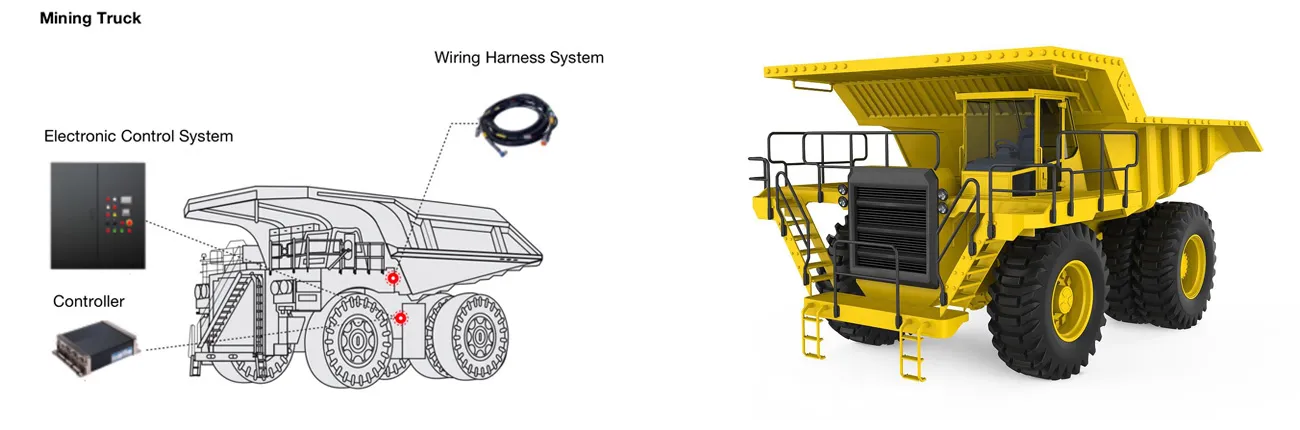
🛻 Mining Trucks
Real-time visualization of propulsion, braking, suspension, and dump bed status.
Supports remote monitoring and diagnostics for enhanced safety and efficiency.
High-brightness display ensures readability in dusty and high-glare environments.
🚛 Articulated Dump Trucks
Displays steering angle, articulation status, and tilt warnings.
Multi-touch interface improves operator intuitiveness.
Seamless integration via CANopen / J1939 protocols.
⛏️ Underground Loaders
Provides critical operation feedback in low-visibility, confined spaces.
Integrated alerts and safety redundancy features enhance operator protection.
High IP-rated housing withstands shock, water, and dust in underground conditions.
🚚 Heavy Haul Trucks
Monitors engine power, driveline performance, and thermal metrics in real time.
Displays long-distance CAN communication status and key operational data.
Customizable UI tailored for bulk material transport applications.
🚛 Garbage Compactor Trucks
Display compaction pressure, tailgate status, and rear-view camera feed.
Visual alerts for hydraulic faults and overload conditions.
Ensures operators maintain full situational awareness during frequent start-stop operations.
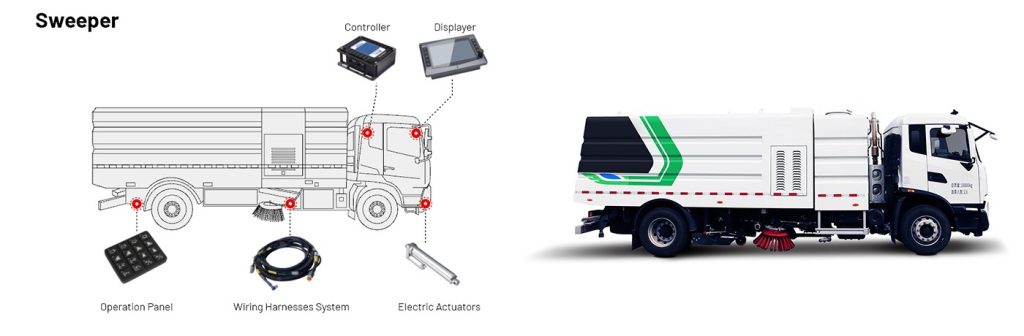
🧹 Street Sweepers
Real-time visualization of brush speed, fan operation, and water spray levels.
Enables intuitive control through a touchscreen interface.
Adapts display layout dynamically based on operating modes or road feedback.
🛻 Sprinkler Trucks
Monitor spray coverage, tank levels, and pump speed in real time.
Display directional nozzle angles for precise control.
Supports outdoor readability and operation under high-vibration conditions.
♻️ Recycling Collection Vehicles
Show lifting arm position, compartment status, and sorting indicators.
Alerts for bin overload, misalignment, or malfunction.
Interfaces with CAN-based subsystems to coordinate sorting and loading.
🚜 Tractors
Real-time display of engine status, hydraulic performance, and implement activity.
Provides fault alerts and operational feedback to enhance control and precision farming.
Supports multi-protocol communication for seamless system integration.
🌾 Combine Harvesters
Visualizes the status and progress of cutting, threshing, and collection systems.
Synchronizes sensor and mechanical subsystems for efficient and stable harvesting.
Customizable interface adapts to various crops and operating conditions.
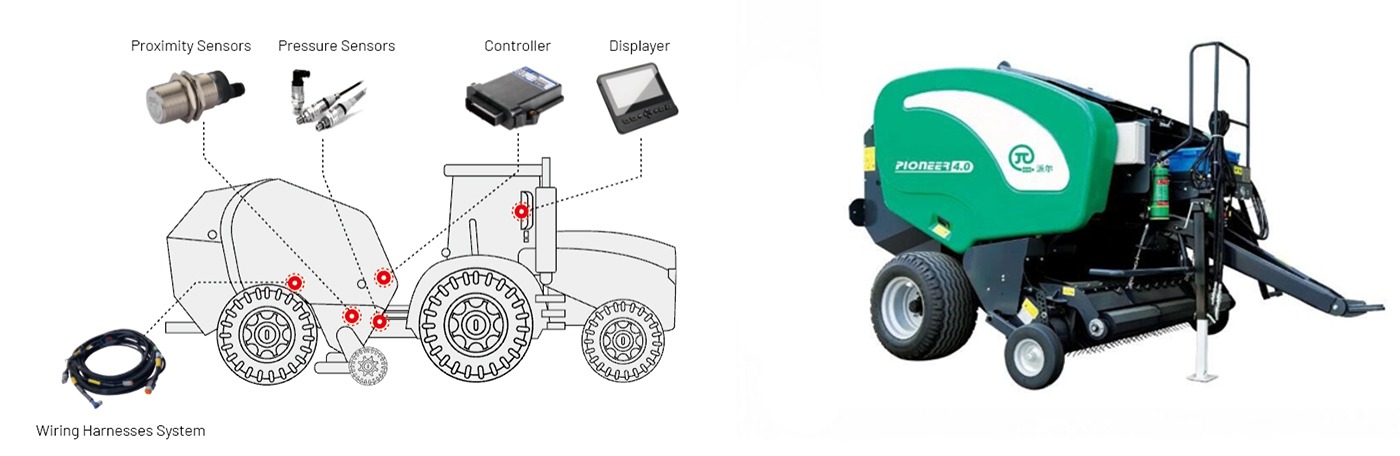
🔄 Round Balers
Displays key parameters and progress for baling, wrapping, and ejection.
Real-time feedback ensures consistent bale density and accurate timing.
Touchscreen interface with alerts reduces manual intervention.
💧 Crop Sprayers
Monitors boom arm position, nozzle pressure, and spray cycle timing.
Displays spray progress and warning indicators for operational precision.
Enables efficient application without GPS dependency.
How to Choose a CAN Bus Display
Compare screen size, visibility, operator input, communication, and interface requirements before selecting a display for your machine.
Screen Size and Mounting Space
Choose a 4.3-inch CAN bus display for compact panels and auxiliary interfaces. A 7-inch CAN bus display provides a balance between visibility and installation space, while 10.1-inch CAN bus displays and 12.1-inch CAN bus displays provide more room for complex dashboards and multiple operating parameters.
Brightness and Outdoor Readability
Compare display brightness, viewing angle, glare, and installation position when selecting a screen for outdoor equipment. The required brightness may vary depending on whether the display is installed inside a cab or exposed to stronger ambient light.
Touchscreen, Physical Keys and Rotary Encoders
Choose the operator input method according to the machine interface and operating workflow. Touchscreens support flexible screen layouts, while physical keys and rotary encoders provide direct access to frequently used functions and menu navigation.
CAN Channels and Communication Protocols
Confirm the required number of CAN channels and whether the machine system uses SAE J1939, CANopen, or a custom CAN protocol. The display configuration must match the communication settings and data structure used by the connected controllers and devices.
Additional Interfaces and Local I/O
Check whether the project requires Ethernet, USB, RS232, camera interfaces, or local input and output channels. Interface availability and I/O resources vary between display models.
Programming and Interface Customization
Consider whether the project requires CODESYS 3.5 programming, custom screen layouts, multilingual interfaces, startup logos, or application-specific data visualization.
Environmental Protection
SonnePower mobile machinery displays provide IP65 protection. Installation conditions, connector sealing, operating temperature, and exposure to water or dust should also be considered during product selection.
Not sure which display fits your system? Send us your required screen size, CAN protocol, interfaces, and I/O requirements.
Get Display Selection SupportFrequently Asked Questions
Find answers to common questions about selecting and integrating SonnePower CAN bus displays for mobile machinery.
What is a CAN bus display?
A CAN bus display is an operator interface that receives data from controllers and other devices through a CAN network. It can present machine parameters, operating states, warnings, menus, and other application-defined information.
Which screen sizes are available?
SonnePower offers 4.3-inch , 7-inch , 10.1-inch and 12.1-inch CAN bus display options. The appropriate size depends on mounting space, viewing distance, and the amount of information required on the interface.
Get Display Selection SupportWhich CAN protocols are supported?
SonnePower CAN bus displays support SAE J1939, CANopen, and custom CAN communication. The selected display must be configured to match the baud rate, message format, and data definitions used by the machine network.
Do the displays support CODESYS 3.5?
Yes. SonnePower programmable CAN bus displays support CODESYS 3.5 for interface development, data processing, application programming, online monitoring, and commissioning.
Are the displays rated IP65?
Yes. SonnePower mobile machinery displays provide IP65 protection. Correct mounting and connector installation are still required to maintain the intended protection in the completed system.
Can the display interface be customized?
The screen layout, data fields, gauges, menus, colors, startup logo, and other interface elements can be configured according to project requirements. Available customization options should be confirmed for the selected display model.
Can a display connect to third-party controllers?
Yes, provided that the display and controller use compatible CAN communication settings and message definitions. Confirm the protocol, baud rate, CAN identifiers, and required data before integration.
Do all display models have the same interfaces and I/O?
No. The number of CAN channels and the availability of Ethernet, USB, RS232, camera interfaces, and local I/O vary by model. Review the specification of the selected display before system design.
How can I choose the right display for my project?
Provide the required screen size, resolution, brightness, operator input method, CAN protocol, interface types, local I/O, supply voltage, and installation conditions. SonnePower can help identify the most suitable display configuration.
Contact SonnePower