 Skip to content
Why Mobile Machinery Controllers Need Sleep Mode and CAN Wake-Up
Modern mobile machinery increasingly relies on electronic control systems.
A single machine may contain:
- controllers (ECUs)
- displays (HMI)
- distributed I/O modules
- keypads
- sensors
- telematics devices
- cameras
These components often remain connected even when the machine is parked.
This creates an engineering challenge:
How do you reduce power consumption without losing the ability to wake the machine quickly when needed?
The answer usually involves:
- sleep mode
- standby mode
- CAN wake-up
- selective wake-up
These functions are not simply “power-saving features.”
For mobile machinery:
Sleep and wake-up logic directly affect battery life, machine reliability, and long-term field performance.
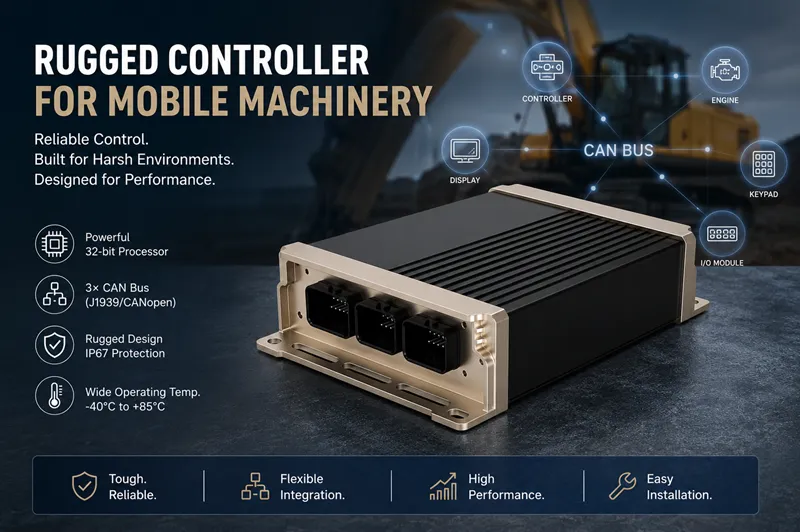
Why Sleep Mode Matters for Mobile Machinery Controllers
Many people assume:
Machine OFF = zero power consumption
However, this is often incorrect.
Controllers and electronic modules may continue drawing standby current.
Over days or weeks:
This small current consumption can accumulate.
Eventually:
- battery voltage drops,
- startup fails,
- service teams receive complaints,
- machines cannot operate normally.
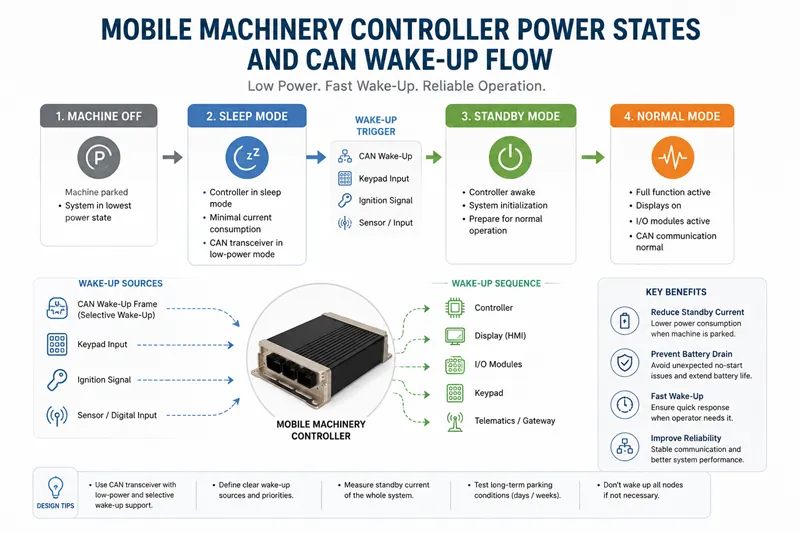
Standby Current and Battery Drain in Parked Machines
Imagine:
A sanitation vehicle remains parked for 10 days.
The system includes:
- controller
- CAN display
- telematics gateway
- distributed I/O
- keypad
If these modules remain partially active:
Battery drain continues.
The result:
The battery appears weak, but the actual issue is poor power management strategy.
Why “Power Off” Does Not Always Mean Zero Consumption
A controller may enter:
Normal Mode
Machine operating
↓
Standby Mode
Fast recovery but moderate current
↓
Sleep Mode
Minimal current consumption
Each state balances:
- reaction speed
- power usage
- wake-up capability
How CAN Wake-Up Works in a Controller System
Sleep mode only works if the controller can wake reliably.
This is where:
CAN Wake-Up
becomes important.
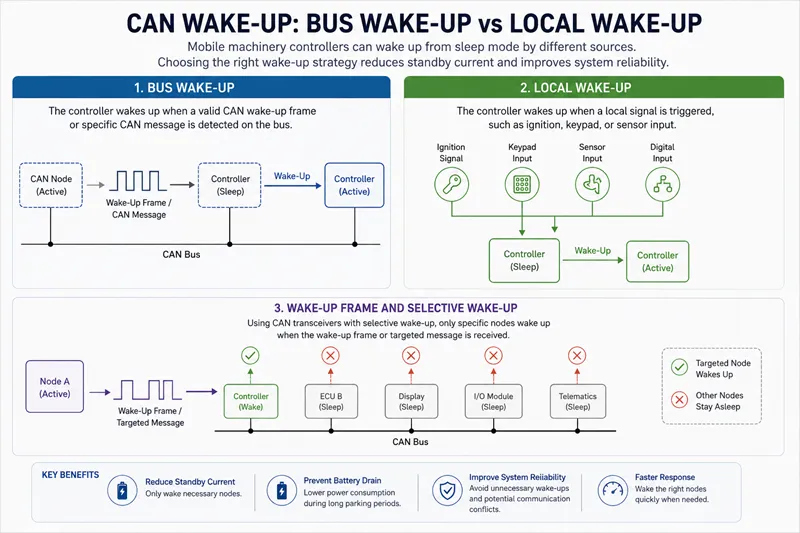
Bus Wake-Up vs Local Wake-Up
Controllers may wake because of:
Bus Wake-Up
Wake caused by:
- CAN message
- wake-up frame
- network activity
Local Wake-Up
Wake caused by:
- ignition signal
- keypad press
- digital input
- sensor trigger
Different machines require different wake-up strategies.
Wake-Up Frame and CAN Transceiver Logic
Some CAN transceivers support:
Selective Wake-Up
This means:
Not every CAN message wakes every node.
Instead:
Only specific traffic triggers activation.
This helps reduce unnecessary energy use.
Ignition, Keypad, and Sensor Wake-Up Inputs
Typical wake-up sources:
| Source | Example |
|---|---|
| Ignition | Operator starts machine |
| Keypad | Button pressed |
| Sensor | Door opened |
| CAN | Wake-up frame received |
Good controller design defines:
Which signals should wake the system — and which should not.
Sleep Mode, Standby Mode, and Normal Mode Explained
These states are often confused.
Controller Sleep Mode
Characteristics:
✔ Lowest power consumption
✔ Long parking periods
✔ Reduced battery drain
Disadvantages:
- slower wake-up
Standby Mode for Faster Reaction
Characteristics:
✔ Faster response
✔ Partial electronics active
Disadvantages:
- higher standby current
Normal Operation During Machine Work
Characteristics:
✔ Full communication
✔ Controller active
✔ Display active
✔ CAN traffic active
Highest power consumption.
Selective Wake-Up and CAN Partial Networking
Modern CAN systems increasingly support:
Partial Networking
The idea:
Only wake the modules that are needed.
Why Not Every CAN Message Should Wake Every ECU
Bad strategy:
Any CAN traffic
↓
Wake every node
↓
Higher standby consumption
↓
Battery drain
Better strategy:
Specific message
↓
Target ECU wakes
↓
Other modules remain asleep
This:
reduces power consumption dramatically.
How Partial Networking Reduces Unnecessary Power Consumption
Benefits:
- longer battery life
- lower standby current
- fewer false wake-ups
- improved reliability
Where Selective Wake-Up Fits in J1939 Networks
Wake-Up Design for Displays, I/O Modules, and Keypads
Sleep strategy should apply to the whole system.
Not only:
controller
When the Controller Should Wake the Display
Possible strategy:
Controller wakes
↓
Validate operating state
↓
Display wakes
This avoids:
unnecessary display power consumption.
When I/O Modules Should Stay Asleep
Distributed I/O handling:
- lights
- valves
- switches
may remain asleep until required.
Keypad Wake-Up for Operator Interaction
A keypad press may trigger:
Operator input
↓
Controller wake-up
↓
Display wake-up
↓
System activation
This improves user experience while reducing standby losses.
Common Sleep / Wake-Up Design Mistakes
All Nodes Wake Up on Any CAN Traffic
Common mistake:
Every CAN message
↓
Wake entire system
Result:
High standby current
Display Stays Powered After Machine Shutdown
Displays often consume more power than expected.
Incorrect shutdown strategy causes hidden battery loss.
Controller Sleeps but Cannot Wake Reliably
Poor wake-up design may lead to:
- delayed startup
- failed startup
- intermittent faults
Ignoring Standby Current During Long Parking
Machines parked for:
- weeks
- seasonal storage
- logistics transport
require stricter low-power design.
Design Checklist for Mobile Machinery Controller Power Management
Before releasing a machine:
Validate:
Define Wake-Up Sources
What should wake:
- controller
- display
- I/O
- keypad
Measure Standby Current
Do not estimate.
Measure.
Validate CAN Wake-Up Conditions
Test:
- wake-up frame
- ignition wake
- keypad wake
Test Long-Term Parking Scenarios
Simulate:
7 days
30 days
60 days
Parked machines reveal hidden problems.
Why Sleep Mode Is Becoming More Important
As machines gain:
- connectivity
- telematics
- displays
- remote diagnostics
electronic loads increase.
Without proper sleep strategy:
More features may mean more battery problems.
Future controller design increasingly depends on:
- low-power architecture
- CAN wake-up
- selective wake-up
- intelligent power management