 Skip to content
How to Integrate Cameras with Off-Highway Displays for New Machines and Retrofits
Table of Contents
In off-highway machinery, cameras are no longer optional—they are part of the operator’s core visibility system.
But integrating cameras into a display is not just about connecting video signals.
The real goal is to ensure that the operator sees the right view at the right moment, without distraction or confusion.
This applies to both new machine development and retrofit projects.
What Camera Integration Means for an Off-Highway Display
Camera integration is a system-level task. It involves more than just cameras and a screen.
A typical setup includes:
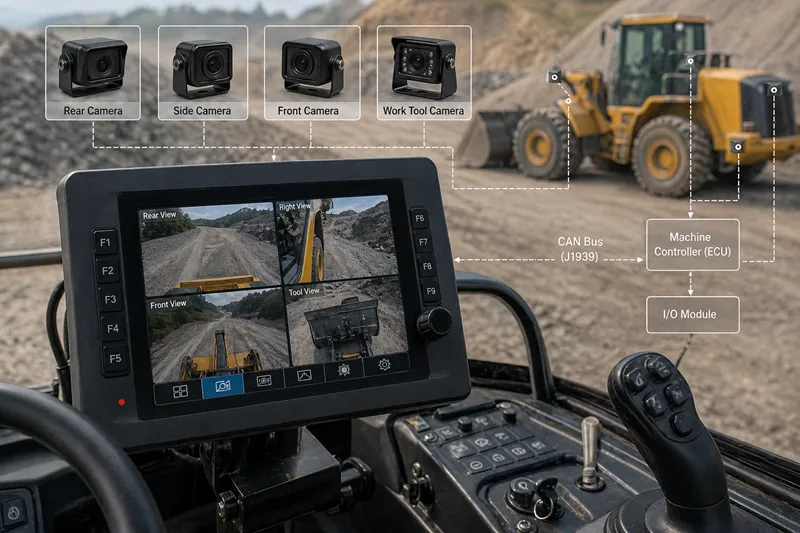
- Cameras (rear, side, front, or work tool)
- A display (HMI)
- Trigger signals (reverse, working mode, or manual input)
- Sometimes a controller for logic coordination
Camera Monitor System vs Simple Backup Camera
A simple backup camera shows a fixed rear view when reversing.
A camera monitor system is different:
- Supports multiple cameras
- Automatically switches views
- Integrates with machine signals
- Provides real-time visibility in different working states
👉 In heavy equipment, a basic camera is not enough.
Why Operator Visibility Depends on Display Logic
The problem is not camera quantity—it is visibility logic.
If all camera views are always visible:
- The screen becomes cluttered
- The operator gets distracted
- Critical information is harder to see
👉 A good system decides:
- When to show each camera
- Which view has priority
- How to reduce cognitive load
AHD Camera, CVBS Camera, and Digital Camera Inputs
Different camera types affect integration complexity and image quality.
When CVBS Is Enough for Retrofit Projects
CVBS (standard analog video) is widely used in older systems.
Advantages:
- High compatibility
- Low cost
- Easy to integrate with existing displays
👉 Best for retrofit and legacy upgrades
Why AHD Is Common for Higher-resolution Vehicle Cameras
AHD (analog HD) provides better image quality while keeping analog simplicity.
Advantages:
- Higher resolution than CVBS
- Works with many modern off-highway displays
- Stable over long cable distances
👉 Common choice for new machines
When Digital or 360° Surround View Systems Make Sense
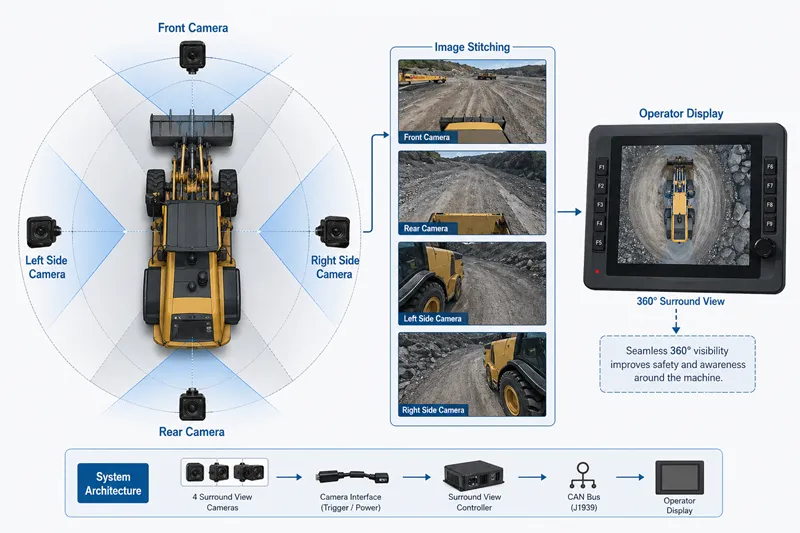
Digital systems are used in more advanced applications:
- 360° surround view
- Image stitching
- AI-assisted vision
👉 Suitable for:
- Mining equipment
- High-end construction machinery
- Autonomous or semi-autonomous systems
Multi-camera Display Design for Heavy Equipment
Most machines use multiple cameras, but design matters more than quantity.
Single View, Split View, and Quad View
Displays typically support:
- Single view → best focus
- Split view → two cameras
- Quad view → multiple inputs
👉 More views ≠ better usability
Rear Camera, Side Camera, Front Camera, and Work Tool Camera
Typical roles:
- Rear camera → reversing safety
- Side camera → blind spot monitoring
- Front camera → navigation
- Tool camera → monitoring attachments
How to Avoid Overloading the Operator
Common mistake: showing everything at once.
Better approach:
- Default to a clean main view
- Switch views based on machine state
- Only show multiple views when needed
👉 Focus on decision clarity, not data quantity
Trigger Input and CAN Bus Trigger Logic
Camera switching should be automatic whenever possible.
Single View, Split View, and Quad View
Displays typically support:
- Single view → best focus
- Split view → two cameras
- Quad view → multiple inputs
👉 More views ≠ better usability
Rear Camera, Side Camera, Front Camera, and Work Tool Camera
Typical roles:
- Rear camera → reversing safety
- Side camera → blind spot monitoring
- Front camera → navigation
- Tool camera → monitoring attachments
How to Avoid Overloading the Operator
Common mistake: showing everything at once.
Better approach:
- Default to a clean main view
- Switch views based on machine state
- Only show multiple views when needed
👉 Focus on decision clarity, not data quantity
Trigger Input and CAN Bus Trigger Logic
Camera switching should be automatic whenever possible.
Reverse Signal for Rear View
The most basic trigger:
- Reverse gear → rear camera
Simple, reliable, widely used.
Work Mode Signal for Attachment or Tool View
When a machine enters working mode:
- Switch to tool camera
- Show working area
Manual Camera Selection Through the HMI
Operators should still be able to:
- Manually select camera views
- Check blind spots or surroundings
CAN Bus Trigger for More Advanced Machine Logic
Advanced systems use CAN signals from the controller:
- Steering → side camera
- Work mode → tool view
- Machine state → automatic switching
👉 This creates a fully integrated system, not just a video feed.
New Machine Integration: Design the System Before Selecting the Camera
For new machines, integration should start at system level.
Define Visibility Requirements
Identify blind spots
Define critical views
Understand operator tasks
Plan Camera Locations and Display Layout
Camera angles and coverage
Screen layout and view priority
Coordinate Display, Controller, and Harness Design
Ensure enough video inputs
Plan wiring and connectors
Integrate with controller signals
Validate Camera View Switching During Operation
Test real scenarios
Ensure smooth switching
Avoid operator confusion