 Skip to content

J1939 Request Message (PGN 59904) Explained for HMIs and Service Tools
In SAE J1939, PGN 59904 is the standard Request Message used when one controller, HMI, or service tool needs another ECU to send a specific parameter group on demand.
It is widely used for practical tasks such as requesting address information, diagnostic data, engine hours, or other PGNs that are not transmitted continuously on the bus.
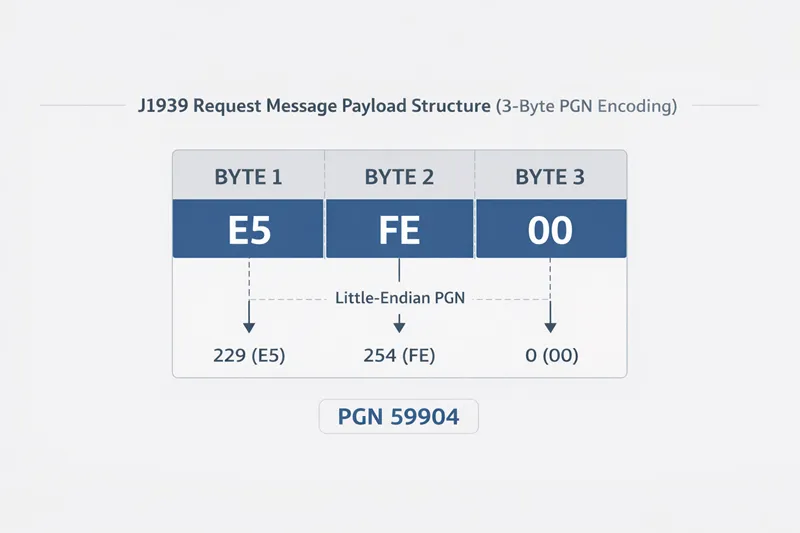
Unlike most J1939 messages, PGN 59904 uses only 3 data bytes, which carry the requested PGN in Intel byte order.
For engineers working on displays, service software, or diagnostics, the real question is not just what PGN 59904 means.
The more useful question is this: what actually happens after the request is sent, and why does the screen sometimes still show no data even when the request frame looks correct? That is where most practical integration problems begin.
What PGN 59904 Does in a J1939 Network
PGN 59904 allows a node to request a specific PGN from another node or from the whole network. In a typical example, a tool may send a request for engine hours, VIN, or Address Claimed information.
The requested PGN is placed into the 3-byte data field in little-endian form. A commonly cited example is requesting PGN 65253 (HOURS), which is sent in the payload as E5 FE 00.
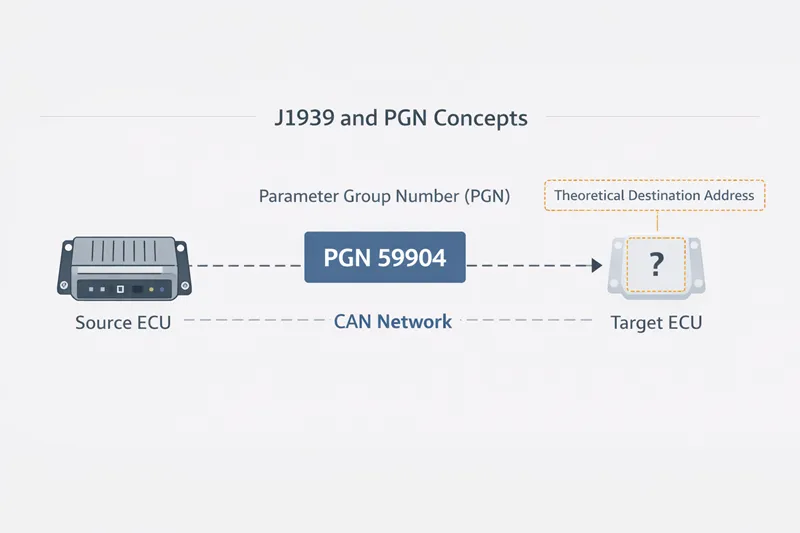
The 29-bit CAN ID of the request also matters. If the destination address is set to 255, the request is global. If it is set to a specific source address, then only that ECU is expected to respond.
This is one of the most important distinctions for HMIs and service tools, because a global request is useful for discovery, while a destination-specific request is usually more stable for repeat data reads.
Why PGN 59904 Matters for HMIs and Service Tools
In many machines, an HMI is not just passively listening. It may actively request data when a page opens, when an operator enters a diagnostics menu, or when a value is configured as request-based instead of cyclic.
A service tool does something similar when it polls a controller for specific information during commissioning or troubleshooting.
That means PGN 59904 often sits right at the boundary between communication logic and user-visible behavior. If the request works, the operator sees a valid value.
If it fails, the HMI may show stale data, an invalid state, or nothing at all. This is why understanding request flow is more useful than memorizing the PGN definition by itself.
Global Request vs Destination-Specific Request
A global request asks every ECU on the network to respond if they support the requested PGN. This is useful when a service tool wants to discover which devices are present or when a node needs the current address table. But global requests can also create ambiguity, because more than one ECU may answer.
A destination-specific request is cleaner when the tool already knows which ECU it wants to talk to. In that case, the request is sent to a single address, and only that ECU should respond.
For engineering use, this is usually the better choice for repeated reads in an HMI or diagnostic workflow because it reduces response noise and makes debugging easier. This is especially true when the requested PGN might also be supported by multiple controllers on the same network.
The Link Between PGN 59904 and Address Claimed (PGN 60928)
One of the most important uses of PGN 59904 is the Request for Address Claimed mechanism. A node can send a PGN 59904 request asking for PGN 60928, which causes controllers on the network to announce their address and NAME information.
This is a core part of J1939 network management and is especially important for transient devices such as service tools or late-joining nodes that need to discover the current address table.
There are also some details here that matter in practice. If a node has not yet claimed an address, the source address of the request may be set to 254 (NULL address).
If the request for Address Claimed is sent globally, the sender is also expected to respond to its own request once it has a valid address. These details are easy to miss, but they matter when a service tool behaves differently from a permanently installed ECU.
What Happens After an HMI or Tool Sends the Request
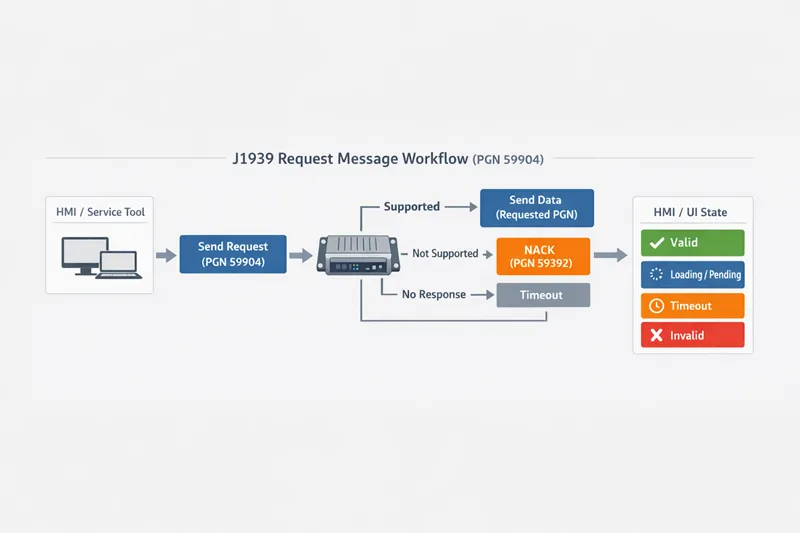
From an implementation perspective, the request flow usually looks like this:
- The HMI or service tool sends PGN 59904.
- The destination ECU, or multiple ECUs in a global request, checks whether the requested PGN is supported.
- If supported, the ECU sends the requested PGN back.
- If unsupported, the ECU may respond with an acknowledgement or negative acknowledgement, depending on the context and addressing.
- The HMI or tool then decides whether the returned value is valid, stale, timed out, or incomplete.
This is where many articles stop. But for HMIs and service tools, that is only the beginning. A correct request frame does not automatically mean the UI will show a correct value.
Why the Request Can Succeed but the Screen Still Shows No Data
This is the part many engineers actually need.
1. The request was sent to the wrong destination address
The frame may be valid, but if the destination address does not match the intended ECU, the expected controller will never answer. In a crowded network, this is a common reason why a request appears “fine” in a trace while the value never updates.
2. The requested PGN is not supported
An ECU does not have to respond with useful data just because it received the request. If the PGN is unsupported, the result may be a NACK, or in some cases a less obvious no-data situation depending on the tool logic and request type.
Copperhill and Vector both point toward the diagnostic importance of acknowledgement behavior, but in real projects the HMI designer still has to decide how that failure appears on screen.
3. The response is multi-packet, but the tool only expected a single frame
Some requested PGNs are longer than one CAN frame and use the J1939 Transport Protocol. In that case, receiving the request correctly is not enough. The tool must also handle TP.CM and TP.DT correctly and reassemble the payload.
If it does not, the engineer may see “request sent” with no meaningful final value. Commanded Address is one known example of a message that requires transport protocol because it exceeds 8 bytes.
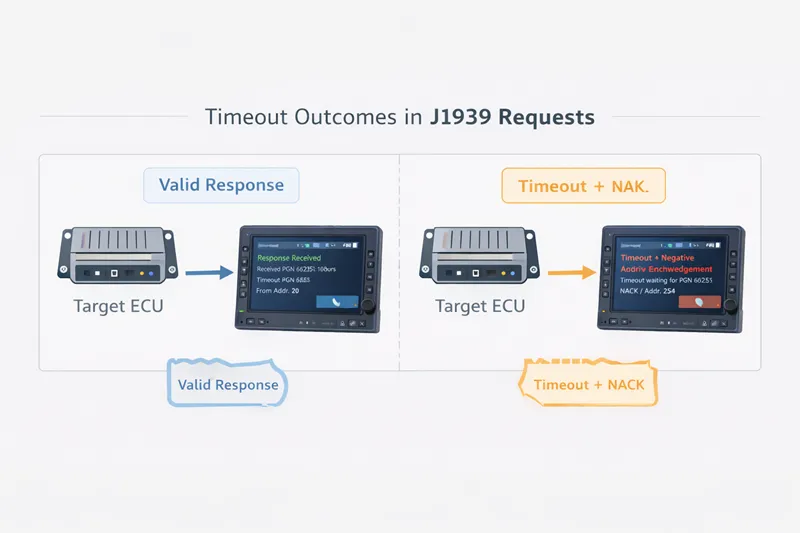
4. The HMI’s timeout logic invalidated the value
In real HMI projects, a variable may briefly receive a response but still become invalid if the receive timeout expires or if the mapping logic expects another refresh pattern.
That means the communication layer may technically work while the interface still shows blank, invalid, or stale data. This is one of the biggest practical gaps between protocol knowledge and actual product behavior.
Best Practices for HMI and Service Tool Design
For most engineering use cases, a better strategy is:
- Use global requests mainly for discovery and network identification.
- Use destination-specific requests for stable, repeated reads from a known ECU.
- Separate UI states clearly: valid, stale, timeout, and invalid.
- Log both the request PGN and the returned PGN during field diagnostics.
- Check early whether the requested response may require transport protocol handling.
This approach aligns better with how real service tools are used on machines. A global request is useful at startup or during discovery, but it is usually not the best method for constant polling on an HMI screen.
A Practical Example
Suppose a service tool wants to request engine hours from one engine ECU. It sends PGN 59904 with the requested PGN encoded in the 3-byte payload. If the request is destination-specific and the ECU supports that PGN, the ECU returns the matching data. If the tool instead sends a global request, other ECUs may also answer if they support the same PGN, making the trace harder to interpret.
Now imagine the CAN log shows that the request was sent correctly, but the HMI still displays nothing. At that point, the engineer should not immediately blame “CAN communication” in general. The better checklist is:
- Did the requester have a valid source address?
- Was the destination address correct?
- Is the requested PGN actually supported by that ECU?
- Was the response single-frame or multi-packet?
- Did the HMI variable expire due to timeout logic?
That checklist is much closer to how real debugging works in the field.
Final Thoughts
PGN 59904 is simple on paper, but its real value appears in how it is used inside HMIs, service tools, and diagnostics workflows. The message itself is just a request. The engineering challenge is everything around it: address state, destination strategy, supported PGNs, acknowledgement behavior, transport protocol handling, and how the final result is presented to the user.
If you are designing a J1939 HMI or service tool, the safest mindset is this: do not treat PGN 59904 as just another CAN frame. Treat it as the start of a request-response process that must be designed, validated, and visualized correctly.